
Set up iCloud Drive on all your devices
You can use iCloud Drive on your iPhone, iPad, Mac, and Windows device, and on iCloud.com. For an overview of what you can do with iCloud Drive, see Keep your files up to date and share them with iCloud Drive.
Note: Make sure you’re signed in to the same Apple Account on each device. If you’re not signed in to your Apple Account on a device, or the device has iCloud Drive turned off, you won’t be able to access your files on the device.
Set up iCloud Drive on your iPhone or iPad
On your iPhone or iPad, go to Settings > [your name] > iCloud.
Tap Drive (or iCloud Drive), then turn on Sync this [device].
A list of apps appears below iCloud Drive. When you turn on an app, it can store data in iCloud.
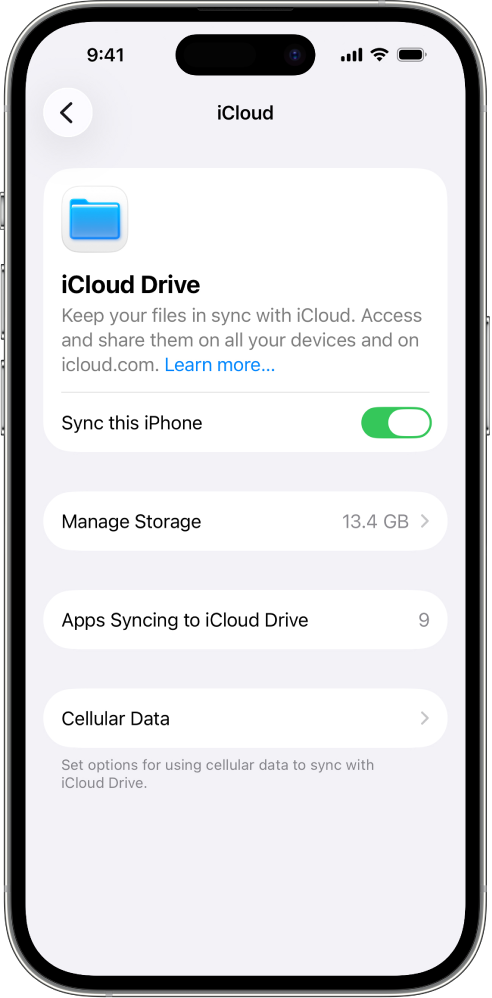
To view your iCloud Drive files and folders, open the Files app and go to the iCloud Drive section.
For more information on how to use iCloud Drive on your iPhone or iPad, see any of the following:
iPhone User Guide: Share files and folders in iCloud Drive on iPhone
iPad User Guide: Share files and folders in iCloud Drive on iPad
Set up iCloud Drive on your Mac
On your Mac, choose Apple menu
 > System Settings, then click your name at the top of the sidebar.
If you don’t see your name, click “Sign in,” enter your Apple Account email address or phone number, then enter your password.
Click iCloud, click Drive (or iCloud Drive), then do one of the following:
macOS 13.3 or later: Turn on Sync this Mac.
macOS 13 to 13.2: Click Turn On, then click Options.
Select or turn on any of the following:
Desktop & Documents Folders: When you select or turn on this option, you can access the files on your desktop and in the Documents folder on any device that has iCloud Drive turned on. See the Apple Support article Add your Desktop and Documents files to iCloud Drive.
An app: When you select or turn on an app, it can store data in iCloud. (If apps aren’t shown, click Apps Syncing to iCloud Drive.)
To view your iCloud Drive files and folders, open the Finder, then click iCloud Drive in the sidebar.
Note: If your Home folder isn’t located on your internal disk, or is a non-APFS volume, you must move the Home folder to an internal disk before you can set up iCloud Drive.
For more information on how to use iCloud Drive on your Mac and how to repair file permissions for files that aren’t syncing, see Work with folders and files in iCloud Drive and Change permissions for files, folders, or disks on Mac in the Mac User Guide.
Set up iCloud Drive on your Apple Vision Pro
On your Apple Vision Pro, go to Settings > [your name] > iCloud.
Tap iCloud Drive, then turn on Sync this Apple Vision Pro.
A list of apps appears below iCloud Drive. When you turn on an app, it can store data in iCloud.
To view your iCloud Drive files and folders, open the Files app and tap iCloud Drive in the sidebar.
For more information on how to use iCloud Drive on your Apple Vision Pro, see View, modify, and organize files and folders in Files in the Apple Vision Pro User Guide.
Set up iCloud Drive on your Windows device
If you don’t already have it, get iCloud for Windows. See the Apple Support article Download iCloud for Windows.
On your Windows device, open iCloud for Windows.
To the right of iCloud Drive, click
 , then turn on iCloud Drive.
Click Done.
To view your iCloud Drive files and folders, open File Explorer, then click iCloud Drive in the Navigation pane.
For more information on how to use iCloud Drive on your Windows device, see View, add, or remove iCloud Drive files in iCloud for Windows and Share iCloud Drive files and folders in iCloud for Windows in the iCloud for Windows User Guide.
Use iCloud Drive on iCloud.com
You can access your iCloud Drive files in a web browser on a phone, tablet, or computer.
Go to icloud.com/iclouddrive and sign in to your Apple Account.
For more information on how to use iCloud Drive on iCloud.com, see Use iCloud Drive on iCloud.com.
You can also set up and use the Pages, Numbers, and Keynote apps with iCloud.