
Sign in and use iCloud.com
You can use iCloud from anywhere by signing in to iCloud.com using a web browser recommended in the Apple Support article System requirements for iCloud.
Sign in to iCloud.com
Go to iCloud.com, then sign in with your Apple ID in any of the following ways:
In any browser: Enter your Apple ID (or another email address or phone number on file) and password.
In Safari: Use Face ID or Touch ID (if you’re already signed in to a device that supports these features).
In supported versions of Google Chrome or Microsoft Edge: Enter your Apple ID, then click “Sign in with Passkey” to scan a QR code (if you turned on iCloud Keychain and have an iPhone or iPad with iOS 17, iPadOS 17, or later).
If prompted, follow the onscreen instructions to verify your identity by entering a code sent to a trusted device or phone number, or by using a security key.
If you lost your trusted device, you can still use Find Devices by clicking the Find Devices button. See Sign in to Find Devices on iCloud.com.
See the Apple Support articles Two-factor authentication for Apple ID, Two-step verification for Apple ID, and About security keys for Apple ID.
Apps and features on iCloud.com
You can use a web browser to view information stored in iCloud from anywhere. You can also access certain iCloud+ features. Learn what you can do with the following apps and features on iCloud.com on a computer:
Note: Not all iCloud features are available in all countries or regions. Some iCloud features have minimum system requirements. See the Apple Support article System requirements for iCloud.
If you don’t see the apps or data you’re looking for
Depending on the device and account you use to sign in to iCloud.com, you have access to different apps and features. If you don’t see what you’re looking for, see if any of the following are true:
You signed in on a mobile device: If you sign in to iCloud on a tablet or a phone, you have access to a different set of apps and features than if you sign in using a computer.
You signed in using a web-only account: If you haven’t signed in with your Apple ID on an Apple device, you have web-only access to iCloud.com.
You signed in using a different Apple ID: If you have multiple Apple IDs, make sure to sign in to iCloud.com with the account that has the data you’re looking for. For example, if you want to see the photos you have stored in iCloud Photos on your iPhone, make sure to sign in to iCloud.com with the same Apple ID you used to sign in to your iPhone. See Sign in to iCloud on all your devices.
You turned on Advanced Data Protection for iCloud: When you turn on Advanced Data Protection for iCloud, you automatically turn off access to your data on the web, so you can only see Find My iPhone and iCloud Settings at iCloud.com. If you want to see all the apps and features on iCloud.com, you can turn on Access iCloud Data on the Web in iCloud settings on your device. (Advanced Data Protection for iCloud can remain on.) See the Apple Support article Manage web access to your iCloud data.
Switch to a different app or feature on iCloud.com
After you sign in to iCloud.com, you can easily access apps, iCloud+ features, and more. Do any of the following:
On the iCloud.com homepage, click the tile of the app or feature you want to use.
Tip: You can also click within a tile—for example, click a note in the Notes tile to open that note directly.
On iCloud.com, click
 in the toolbar, then click another app or feature.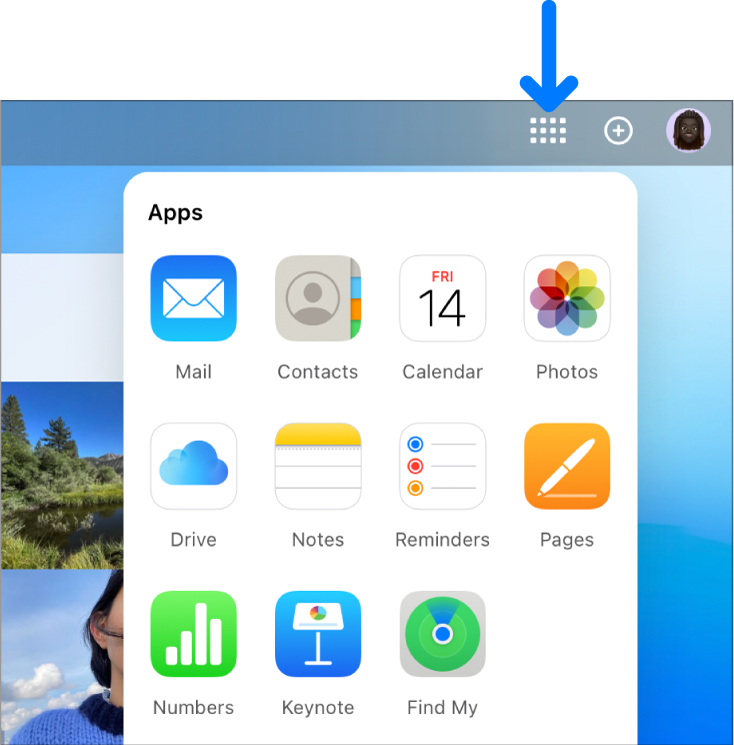
Sign out of iCloud.com
Click your Apple ID photo or  in the top-right corner of the iCloud.com window, then do one of the following:
Sign out from the browser you’re using now: Choose Sign Out.
Sign out from every browser where you’re currently signed in: Click iCloud Settings, click Sign Out Of All Browsers, then click Sign Out.