Watch on iPhone or iPad
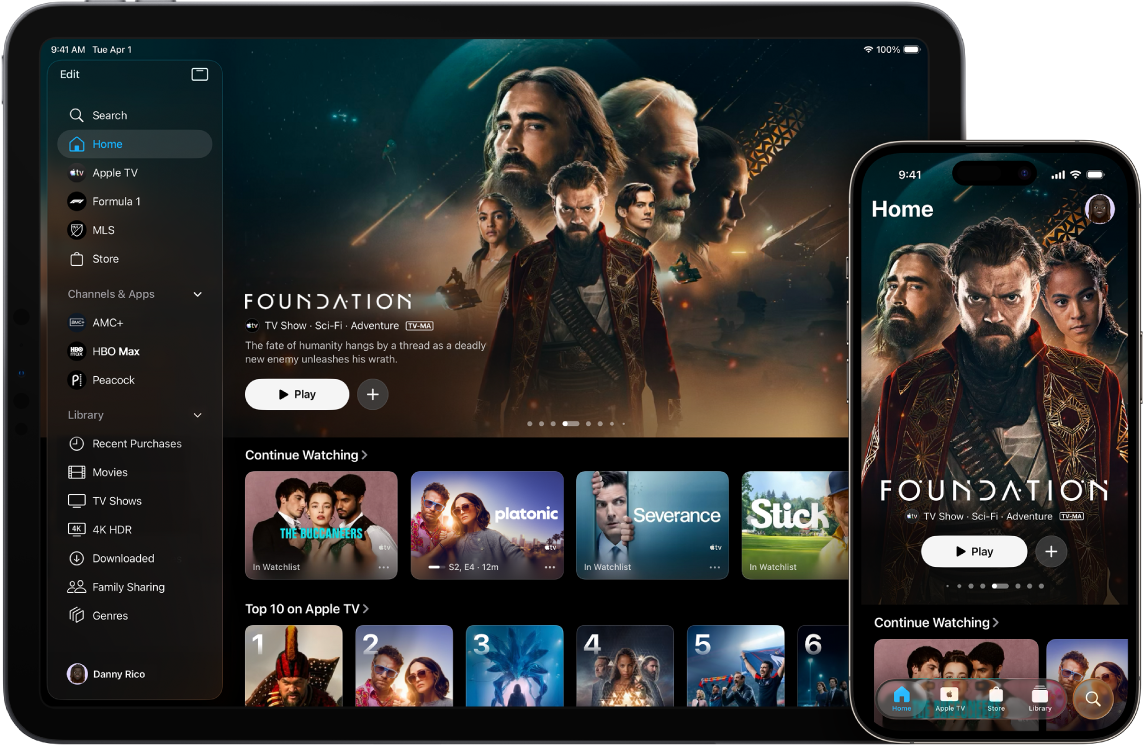
Apple TV and other channels are available in the Apple TV app on devices with the latest versions of iOS and iPadOS. Best of all, you can start watching on a mobile device, then finish later in the Apple TV app on a big-screen TV.
How to watch on iPhone or iPad
To get the latest Apple TV app features, update your iPhone to iOS 17.2 or later or iPad to iPadOS 17.2 or later.
Open the Apple TV app
 on your iPhone or iPad.
Tap any of the following:
Search: Find TV shows and movies by title, cast, or crew.
Home: Start watching movies, TV shows, and sports in one place. Use the Continue Watching row to find items you’ve added to your Watchlist or content you’ve started watching but haven’t finished.
Apple TV: Browse and watch Apple TV, a subscription streaming service featuring Apple Originals—award-winning films, series, compelling dramas, groundbreaking documentaries, kids’ entertainment, comedies, and more. In some countries and regions, Friday Night Baseball is included with your Apple TV subscription.
MLS: When you have an Apple TV subscription, watch every match of the Major League Soccer season, Audi MLS Cup Playoffs, and Leagues Cup all in one place, with consistent match times and no blackouts.
Formula 1 (U.S. only): When you have an Apple TV subscription, watch Formula 1 with your choice of multiple live feeds that you can also watch in Multiview on iPad. Catch all practice, qualifying, Sprint, and Grand Prix races.
Store: Use this all-in-one destination to browse, buy, and rent the world’s best movies and TV shows.
Channels & Apps (iPad only): Select a channel you’ve recently subscribed to, or an app you’ve connected to the Apple TV app.
Library: Find your purchases and rentals, organized by category.
If prompted, sign in to your Apple Account to access your existing subscription or start a free trial.
If you don’t have the latest version of iOS or iPadOS
Do either of the following to watch Apple TV:
Go to tv.apple.com to subscribe to and watch Apple TV in a web browser.