iCloud User Guide
- Welcome
-
-
- Sign in and use iCloud.com
- Customize and use the homepage
- Keynote
- Numbers
- Pages
-
- Photos on iCloud.com overview
- View your photos and videos
- Hide your photos and videos
- Use iCloud Shared Photo Library
- Upload and download photos
- Add a title or caption
- Organize photos and videos
- Add photos and videos to Favorites
- Play a slideshow of photos
- Delete and recover photos and videos
- Share photos and videos
- Recover files and information
- Use iCloud on your Windows computer
- Get more help with iCloud
- Legal notices and acknowledgements
- Copyright

Play a sound on a device with Find Devices on iCloud.com
If you lose your device and you think it’s nearby, you can use Find Devices on iCloud.com to play a sound on it to help you find it. The sound plays even if the device is in silent mode or the volume is muted.
If you have Family Sharing set up, you can also play a sound on a family member’s device. For more information on setting up a family group, see the Apple Support article What is Family Sharing?
To sign in to Find Devices, go to icloud.com/find.
Play a sound on your iPhone, iPad, iPod touch, Mac, or Apple Watch
In Find Devices on iCloud.com, select the device in the All Devices list on the left.
If you’ve already selected a device, you can click All Devices to return to the list and select a new device.
Click Play Sound.
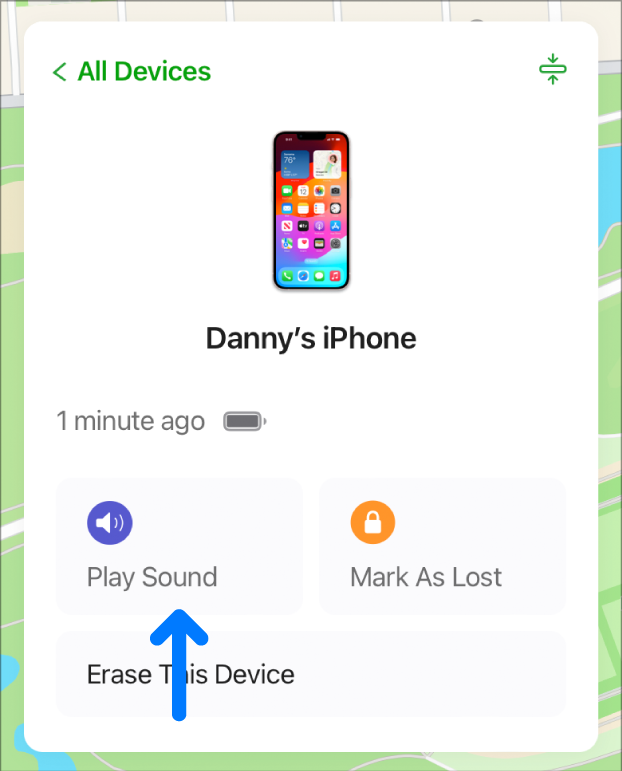
If the device is online, a sound starts after a short delay and gradually increases in volume, then plays for about 2 minutes. A Find My alert also appears on the device’s screen, if applicable.
If the device is offline, the sound plays the next time it connects to a Wi-Fi or cellular network.
After the sound plays, a confirmation email is sent to your Apple ID email address.
If your AirPods are separated, you have additional options to play a sound. See Locate AirPods in Find My in the AirPods User Guide.
Stop playing a sound on a device
If you find your device and want to turn off the sound before it stops automatically, do one of the following:
iPhone, iPad, or iPod touch: Press the power button or a volume button, or flip the Ring/Silent switch. If the device is locked, you can also unlock it, or swipe to dismiss the Find My alert. If the device is unlocked, you can also tap OK in the Find My alert.
Mac: Click OK in the Find My alert.
Apple Watch: Tap Dismiss in the Find My alert, or press the Digital Crown or side button.
AirPods: Put your AirPods in their case and close the lid, or click Stop Playing in Find Devices on iCloud.com.
Beats product: Depending on the model of your Beats product, you can put it in its case and close the lid, or press the power button.
You can also use Find My on any device that’s signed in with the same Apple ID. See Use Find My to locate people, devices, and items.