Final Cut Pro Logic Effects
- Welcome
-
- Intro to echo effects
-
- Intro to Delay Designer
- Delay Designer interface
- Main display controls
- View buttons
- Navigate the Tap display
- Create taps
- Select taps
- Move and delete taps
- Use the tap toggle buttons
- Edit taps in the Tap display
- Align tap values
- Edit filter cutoff
- Edit pan
- Tap parameter bar
- Tap shortcut menu
- Reset tap values
- Master section controls
- Use Delay Designer in surround
- Modulation Delay
- Stereo Delay
- Tape Delay
- Copyright
Phase Distortion controls in Final Cut Pro for Mac
The Phase Distortion effect is based on a modulated delay line, similar to a chorus or flanger effect (see Intro to modulation effects in Final Cut Pro for Mac). Unlike these effects, however, the delay time is not modulated by a low-frequency oscillator (LFO), but rather by a lowpass-filtered version of the input signal itself, using an internal side chain. This means that the incoming signal modulates its own phase position.
The input signal only passes the delay line and is not affected by any other process. The Mix parameter blends the effect signal with the original signal.
To add the Phase Distortion effect to a clip and show the effect’s controls, see Add Logic effects to clips in Final Cut Pro for Mac.
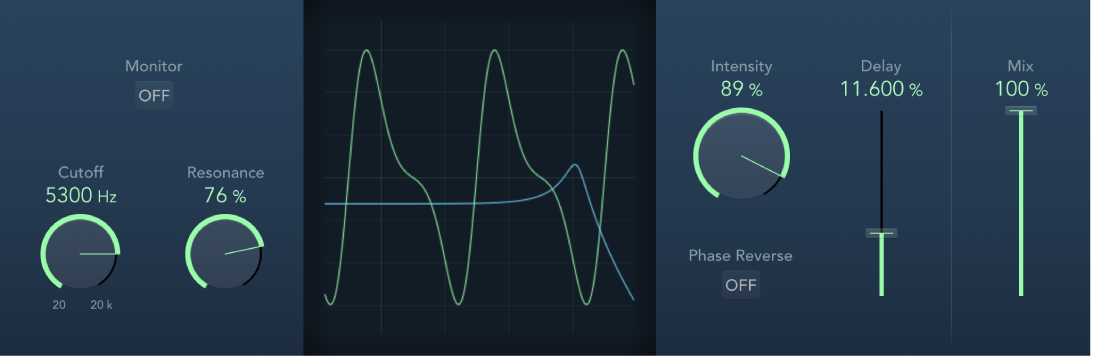
Monitor button: Turn on to hear the input signal in isolation. Turn off to hear the mixed signal.
Cutoff knob and field: Set the (center) cutoff frequency of the lowpass filter.
Resonance knob and field: Emphasize frequencies surrounding the cutoff frequency.
Display: Shows the impact of parameters on the signal.
Intensity knob and field: Set the amount of modulation applied to the signal.
Phase Reverse button: Turn on to reduce the delay time on the right channel when input signals that exceed the cutoff frequency are received. Available only for stereo instances of the Phase Distortion effect.
Delay slider and field: Set the maximum delay time.
Mix slider and field: Set the percentage of the effect signal mixed with the original signal.
Download this guide: PDF