
iCloud encryption
Data encryption in iCloud is closely tied to the data storage model, starting with the CloudKit frameworks and APIs that allow apps and system software to store data in iCloud on behalf of the user, and keep everything up to date across devices and on the web.
CloudKit encryption
CloudKit is a framework that lets app developers store key-value data, structured data and assets (large data stored separately from the database, such as images or videos) in iCloud. CloudKit supports both public and private databases, grouped in containers. Public databases are globally shared, typically used for generic assets and aren’t encrypted. Private databases store each user’s iCloud data.
CloudKit uses a hierarchy of keys that matches the structure of the data. Each container’s private database is protected by a key hierarchy, rooted in an asymmetric key called a CloudKit Service key. These keys are unique to each iCloud user and generated on their trusted device. When data is written to CloudKit, all record keys are generated on the user’s trusted device and wrapped to the appropriate key hierarchy before any data is uploaded.
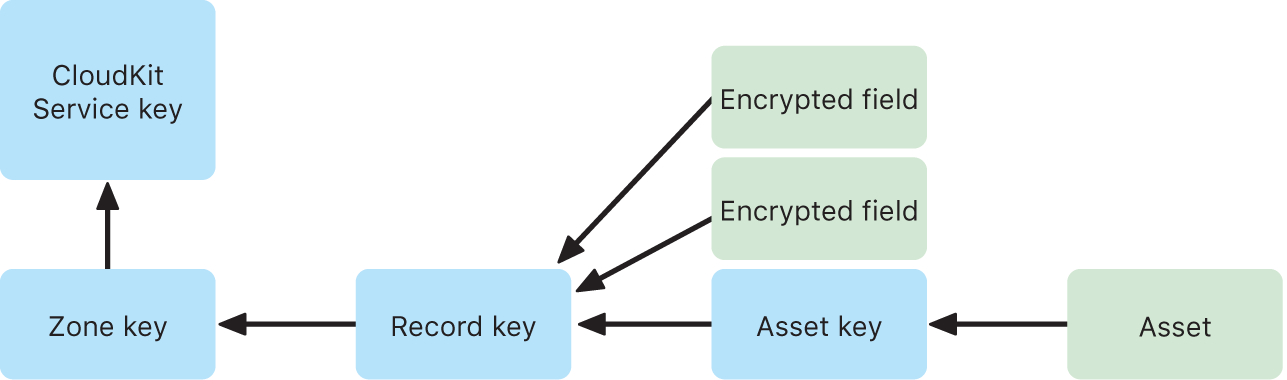
Many Apple services listed in the Apple Support article iCloud data security overview use end-to-end encryption with a CloudKit service key that’s protected in the same way as iCloud Keychain syncing. For these CloudKit containers, the service keys are available only on the user’s trusted devices and can’t be accessed by Apple or any third party. These keys are synchronised between a user’s devices even if the user chooses not to use iCloud Keychain to sync their passwords, passkeys and other user data. In the event of device loss, users can recover their iCloud Keychain data through the use of Secure iCloud Keychain recovery, Account Recovery Contacts or an Account Recovery Key.
Encryption key management
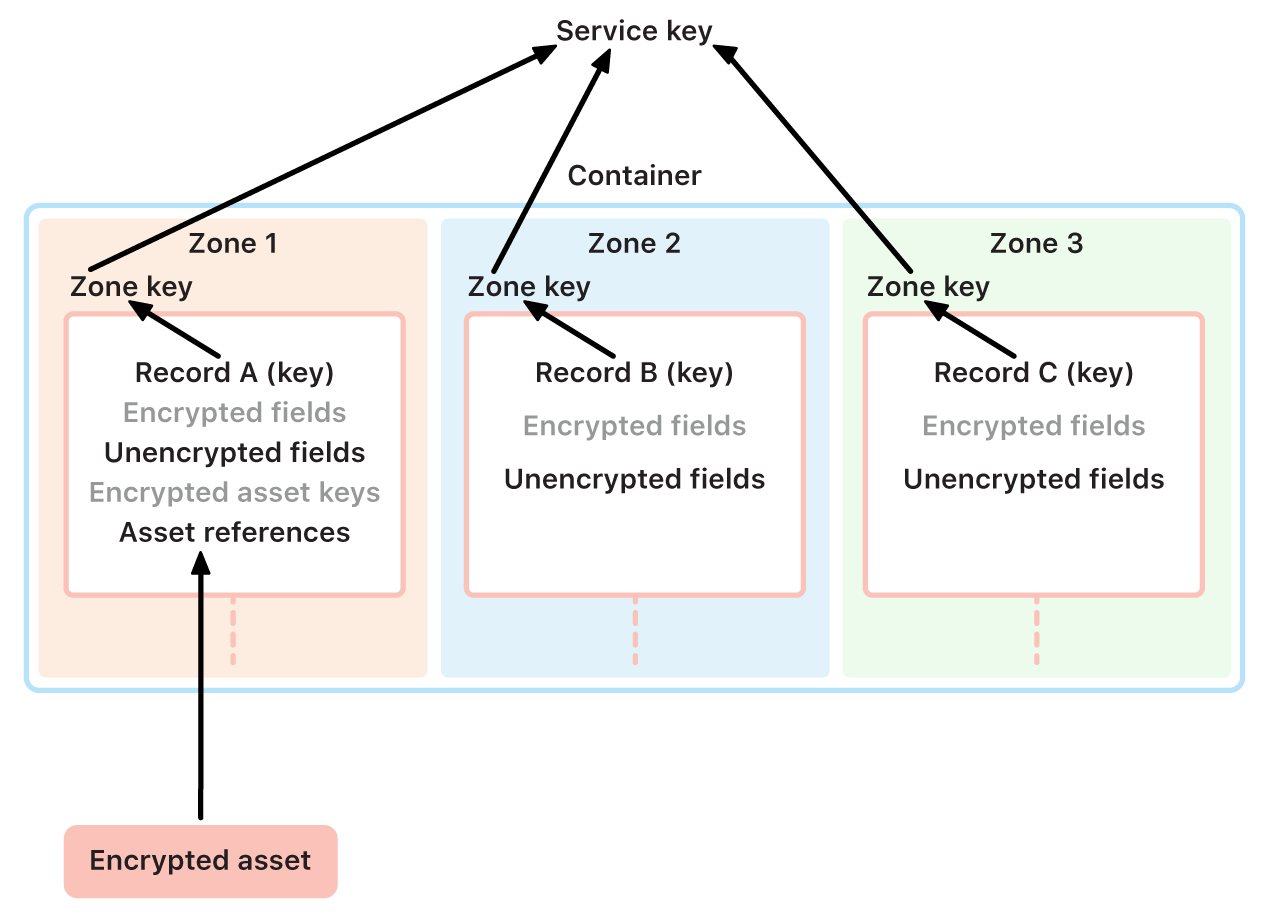
The security of encrypted data in CloudKit relies on the security of the corresponding encryption keys. CloudKit service keys are divided into two categories: end-to-end encrypted and available-after-authentication.
End-to-end encrypted service keys: For end-to-end encrypted iCloud services, the relevant CloudKit service private keys are never made available to Apple servers. Service key pairs, including the private keys, are created locally on a user’s trusted device and transferred to the user’s other devices using iCloud Keychain security. Although iCloud Keychain recovery and synchronisation flows are mediated by Apple servers, these servers are cryptographically prevented from accessing any of the user’s keychain data. In the worst case of losing access to iCloud Keychain and all its recovery mechanisms, the end-to-end encrypted data in CloudKit is lost. Apple can’t help recover this data.
Available-after-authentication service keys: For other services, such as Photos and iCloud Drive, the service keys are stored in iCloud Hardware Security Modules in Apple data centres, and can be accessed by some Apple services. When a user signs in to iCloud on a new device and authenticates their Apple Account, these keys can be accessed by Apple servers without further user interaction or input. For example, after signing in to iCloud.com, the user can immediately view their photos online. These service keys are available-after-authentication keys.