
Use AirDrop to send items to nearby Apple devices
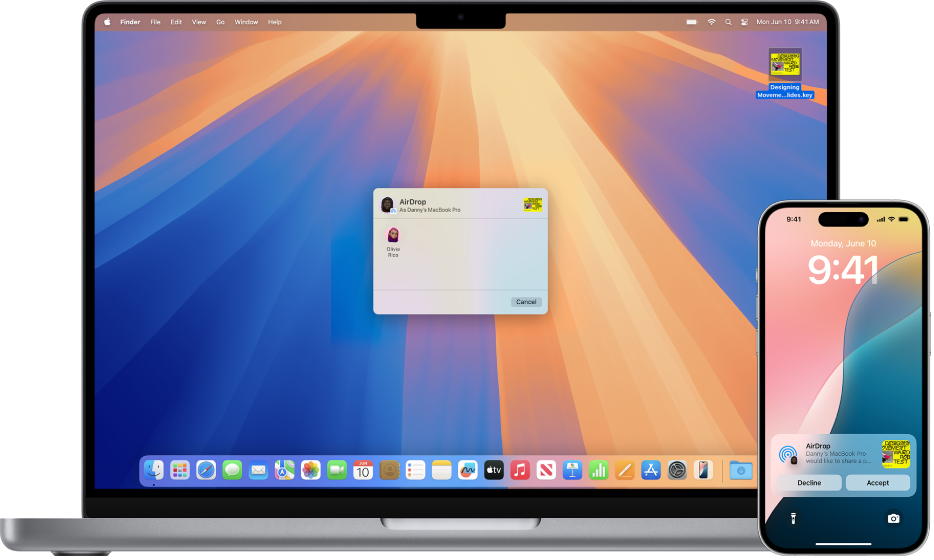
With AirDrop, you can wirelessly send photos, videos, documents, and more to a nearby iPhone, iPad, or Mac. You can use AirDrop to send files to your own devices, or to share files with others.
Transfers are encrypted for security, and the recipient can accept or decline each transfer as it arrives.
Note: If you leave Bluetooth or Wi-Fi range after an AirDrop transfer is initiated, the transfer continues over the internet.
Before you begin
Make sure of the following:
Your devices are within 30 feet (10 meters) of each other.
If you’re using AirDrop to send items between your Apple devices, sign in to the same Apple Account to automatically accept and save the items.
Turn on AirDrop
On an iPhone or iPad: Open Control Center, touch and hold the top-left group of controls, then tap
 . Tap Contacts Only or Everyone for 10 Minutes to choose who you want to receive items from.
Note: The Contacts Only and Everyone for 10 Minutes options are available only on devices with minimum system requirements.
On a Mac: Click
 in the menu bar, then click . When it’s blue, it’s on.
To choose who can send items to you, click
 next to AirDrop, then click Contacts Only or Everyone.
Send an item with AirDrop
To send an item to someone with AirDrop, both you and your recipient must have turned on AirDrop and chosen to accept items either from Contacts or Everyone. If a recipient chooses to only accept items from a contact, you must be in their contacts list and they need to have your Apple Account email address or phone number included in your contact card.
Then do any of the following:
On an iPhone or iPad: Open the item, then tap
 , Share, ,
  , or another button (depending on the app). Tap , then tap the recipient you want to share with. The recipients you see are those who are nearby, have Wi-Fi and Bluetooth turned on, and are able to accept files from your device.
Tip: If you’re within close range of someone in your contacts, you can initiate an AirDrop transfer by opening the file you want to share, then moving your iPhone close to your contact’s iPhone (on supported models with iOS 17 or later).
On a Mac: Open the item, click
in the toolbar, then click AirDrop. Select the recipient you want to share with. The recipients you see are those who are nearby, have Wi-Fi and Bluetooth turned on, and are able to accept files from your device.Tip: You can also share items with AirDrop in the Finder. To open a Finder window, click
 in the dock. Click AirDrop in the sidebar, then drag the item you want to share to the recipient you want to send it to.
To use AirDrop to securely share app and website passwords with someone using an iPhone, iPad, or Mac, see Share passkeys and passwords securely with AirDrop on iPhone, Share passkeys and passwords securely with AirDrop on iPad, or Share passwords and passkeys securely with AirDrop on Mac.
Receive items with AirDrop
On your device, tap or click Accept on the AirDrop notification.
Most items are saved in the app that they’re sent from. For example, if someone uses AirDrop to send you a photo from the Photos app, it’s saved in the Photos app on your device.
Depending on the device, you might find your files in other places. On an iPhone or iPad, some items may be saved in the Files app. On a Mac, some items are automatically saved in the Downloads folder. You may also have the option to choose where to save items.
Note: If you opened AirDrop in the Finder on a Mac, the notification to accept or decline appears here, rather than in Notification Center.
If you send items from one of your Apple devices to another (for example, from your Mac to your iPhone), and you’re signed in to the same Apple Account for iCloud on both devices, the item is automatically accepted and saved.
If AirDrop isn’t working
Make sure that both the sender and recipient have Wi-Fi and Bluetooth turned on and that you’re both using an iPhone, iPad, or Mac.
Check that the recipient has their AirDrop settings set to receive from Everyone or Contacts Only.
Your devices must be within 30 feet (10 meters) of one another.
If you’re having difficulty getting AirDrop to work, restart your device and try again.
For additional support, see the Apple Support article How to use AirDrop on your iPhone or iPad.
AirDrop is best for sharing a small selection of files between devices. If you want to share many files between your Mac and other Apple devices, see Sync content between your Mac and iPhone, iPad, or iPod touch or How iCloud keeps information up to date across all your devices.