Logic Pro User Guide for iPad
- Welcome
- What’s new in Logic Pro for iPad
-
- What is Logic Pro?
- Working areas
- Work with the menu bar
- Work with function buttons
- Work with numeric values
- Undo and redo edits in Logic Pro for iPad
-
- Intro to tracks
- Create tracks
- Create tracks using drag and drop
- Choose the default region type for a software instrument track
- Select tracks
- Duplicate tracks
- Reorder tracks
- Rename tracks
- Change track icons
- Change track colors
- Use the tuner on an audio track
- Show the output track in the Tracks area
- Delete tracks
- Edit track parameters
- How to get help
-
- Intro to recording
-
- Before recording software instruments
- Record software instruments
- Record additional software instrument takes
- Record to multiple software instrument tracks
- Record multiple MIDI devices to multiple tracks
- Record software instruments and audio simultaneously
- Merge software instrument recordings
- Spot erase software instrument recordings
- Replace software instrument recordings
- Route MIDI internally to software instrument tracks
- Record with Low Latency Monitoring mode
- Use the metronome
- Use the count-in
-
- Intro to arranging
-
- Intro to regions
- Select regions
- Cut, copy, and paste regions
- Move regions
- Remove gaps between regions
- Delay region playback
- Trim regions
- Loop regions
- Repeat regions
- Mute regions
- Split and join regions
- Stretch regions
- Separate a MIDI region by note pitch
- Bounce regions in place
- Change the gain of audio regions
- Normalize audio regions in the Tracks area in Logic Pro for iPad
- Create regions in the Tracks area
- Convert a MIDI region to a Session Player region or a pattern region
- Replace a MIDI region with a Session Player region in Logic Pro for iPad
- Rename regions
- Change the color of regions
- Delete regions
-
- Intro to chords
- Add and delete chords
- Select chords
- Cut, copy, and paste chords
- Move and resize chords
- Loop chords on the Chord track
- Color chords on the Chord track
- Edit chords
- Work with chord groups
- Use chord progressions
- Change the chord rhythm
- Choose which chords a Session Player region follows
- Analyze the key signature of a range of chords
- Analyze the chords in an audio or MIDI region with Chord ID
- Create fades on audio regions
- Extract vocal and instrumental stems with Stem Splitter
- Access mixing functions using the Fader
-
- Intro to editing regions and cells
-
-
- Piano Roll Editor overview
- Select notes
- Add notes
- Delete notes
- Mute notes
- Trim notes
- Move notes
- Copy notes
- Repeat notes
- Shorten overlaps
- Force legato
- Lock note position
- Transpose notes
- Change note velocity
- Change release velocity
- Change MIDI channel
- Set articulation IDs
- Quantize timing
- Quantize pitch
- Edit Live Loops in the Cell Editor
-
- Intro to Step Sequencer
- Use Step Sequencer with Drum Machine Designer
- Chords and pitch in Step Sequencer
- Record Step Sequencer patterns live
- Step record Step Sequencer patterns
- Load and save patterns
- Modify pattern playback
- Edit steps
- Edit rows
- Edit Step Sequencer pattern, row, and step settings in the inspector
- Customize Step Sequencer
-
- Intro to mixing
-
- Channel strip types
- Channel strip controls
- Peak level display and clipping
- Set channel strip volume
- Set channel strip input format
- Set the output for a channel strip
- Set channel strip pan position
- Mute and solo channel strips
- Reorder channel strips
- Replace a patch on a channel strip using drag and drop
- Work with plug-ins in the Mixer
- Search for plug-ins in the Mixer
-
-
- Effect plug-ins overview
-
- Instrument plug-ins overview
-
- ES2 overview
-
- Modulation overview
- Use the Mod Pad
-
- Vector Envelope overview
- Use Vector Envelope points
- Use Vector Envelope solo and sustain points
- Set Vector Envelope segment times
- Vector Envelope XY pad controls
- Vector Envelope Actions menu
- Vector Envelope loop controls
- Vector Envelope point transition shapes
- Vector Envelope release phase behavior
- Use Vector Envelope time scaling
- Modulation source reference
- Via modulation source reference
- Use macro controls
-
- Sample Alchemy overview
- Interface overview
- Add source material
- Save a preset
- Edit mode
- Play modes
- Source overview
- Synthesis modes
- Granular controls
- Additive effects
- Additive effect controls
- Spectral effect
- Spectral effect controls
- Filter module
- Low, bandpass, and highpass filters
- Comb PM filter
- Downsampler filter
- FM filter
- Envelope generators
- Mod Matrix
- Modulation routing
- Motion mode
- Trim mode
- More menu
- Sampler
- Studio Piano
- Copyright and trademarks
Vintage B3 Preset and Morph controls in Logic Pro for iPad
The Hammond B3 is equipped with 12 buttons, located below the drawbars. These preset keys are laid out like a keyboard octave, but with black keys and white sharps. They are used to recall drawbar registrations (also known as drawbar positions). Vintage B3 replicates these features. See Use Vintage B3 preset keys.
You can also switch—or smoothly crossfade (morph)—between the presets of the upper manual. See Use Vintage B3 Morph controls.
Tap the Details button at the top of the plug-in to view and adjust these Vintage B3 parameters.
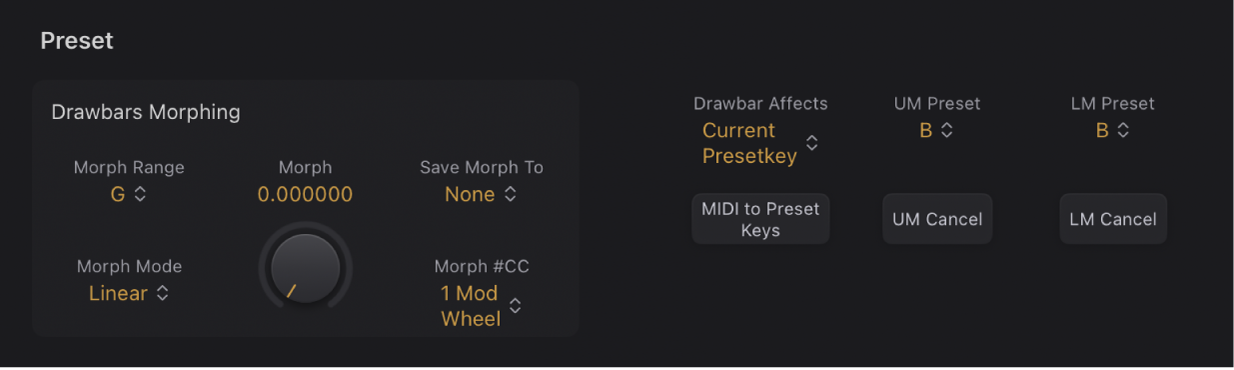
Preset Drawbars Morphing parameters
Preset and Morph parameter use is covered in Use Vintage B3 preset keys and Use Vintage B3 Morph controls.
Morph Range pop-up menu: Choose a range of keys for morph presets. Choose Off to bypass the morph range that is set up.
Morph Mode pop-up menu: Choose Step to abruptly switch between presets. Choose Linear to smoothly morph (crossfade drawbar positions) between presets.
Morph knob and field: Control the switching or morphing between presets. You can also assign and use a MIDI controller such as your keyboard modulation wheel to control the Morph parameter.
Save Morph To pop-up menu: Choose Preset keys for the morph.
Morph #CC pop-up menu: Assign a MIDI controller to the Morph knob. You can choose any MIDI controller number shown (or channel aftertouch). You can also tap Learn to teach the Morph knob to respond to any incoming MIDI message.
Preset parameters
Drawbar Affects pop-up menu: Choose Current Presetkey to always change the registration of the currently active preset registration key. Choose B and Bb Key to mirror the behavior of a real Hammond organ, where the drawbars affect only the Bb (upper manual) and B (lower manual) preset registrations.
MIDI to Preset Keys button: Turn on or turn off preset switching with MIDI notes 24 to 35.
UM Preset pop-up menu: Choose a preset key for the upper manual. The current upper manual drawbar settings are immediately stored to the chosen key (unless the Drawbar Affects pop-up menu is set to B and Bb Key.)
UM Cancel button: Tap to clear the registration of the preset key shown in the UM Preset pop-up menu.
LM Preset pop-up menu: Choose a preset key for the lower manual. The current lower manual drawbar settings are immediately stored to the chosen key (unless the Drawbar Affects pop-up menu is set to only B and Bb Key.)
LM Cancel button: Tap to clear the registration of the preset key shown in the LM Preset pop-up menu.
Download this guide: PDF