ဤထိန်းချုပ်မှုကို ပြင်ဆင်ခြင်းဖြင့် ဤစာမျက်နှာကို အလိုအလျောက် အပ်ဒိတ်လုပ်ပေးပါမည်
MacBook Pro Essentials
- Welcome
- Introducing the new 14-inch and 16-inch MacBook Pro
-
- Take a tour: New 14-inch and 16-inch MacBook Pro
- Take a tour: 13-inch MacBook Pro
- What’s included: 14-inch and 16-inch MacBook Pro
- What’s included: 13-inch MacBook Pro
- Magic Keyboard for 14-inch and 16-inch MacBook Pro
- Magic Keyboard for 13-inch MacBook Pro
- 13-inch MacBook Pro: Use the Touch Bar
- 13-inch MacBook Pro: Customize the Touch Bar
- Trackpad
- Charge the battery
- Accessories
- Work wirelessly
- Use an external display
- New features on your MacBook Pro
- Copyright
Screen Time on Mac
Screen Time shows you how you spend time in apps and on websites. It also lets you monitor what your kids are doing on their Apple devices.
Set your limits. Set limits to control how much time you spend with specific apps, categories of apps, and websites. You can also view reports to see how much time you’re spending with apps and websites, and schedule downtime away from your Mac.
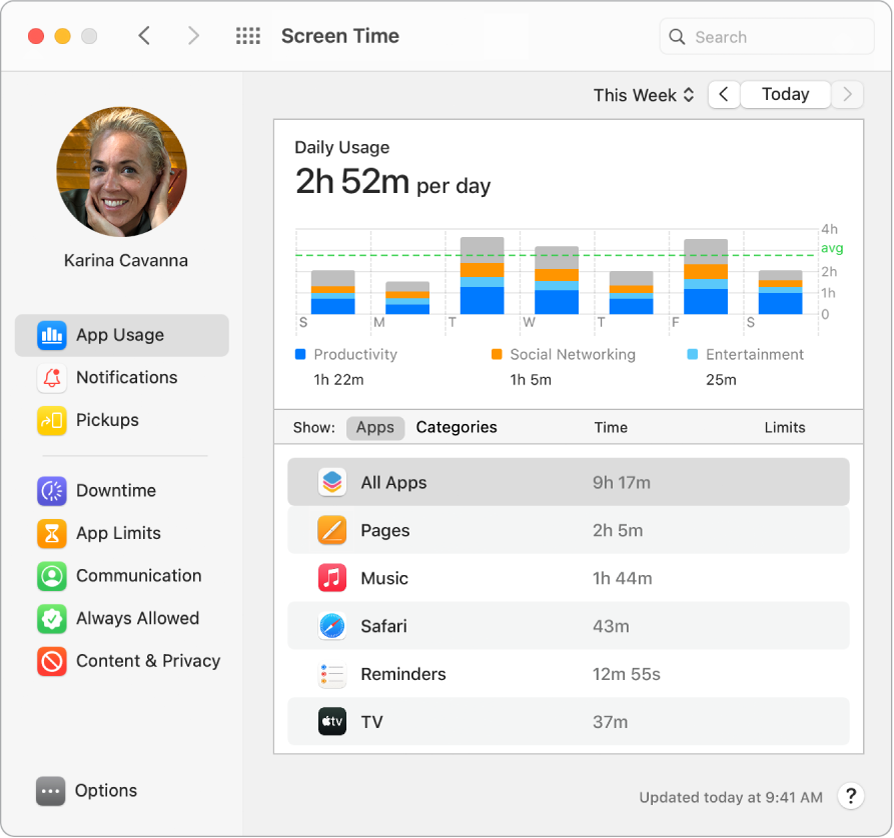
Family sharing. Parents can configure Screen Time on their Mac—or iPhone or iPad—and everything is set up for their kids on their devices.
One-tap media ratings. While setting up Screen Time for your kids, you can set age-based media ratings for the Music and Books apps.
Learn more. See Set up Screen Time for a child on Mac in the macOS User Guide.
သင်၏ အကြံပြုချက်အတွက် ကျေးဇူးတင်ပါသည်။