Keynote: come impedire l'apertura delle applicazioni durante una presentazione Keynote
Scopri come impedire l'apertura delle applicazioni durante una presentazione Keynote.
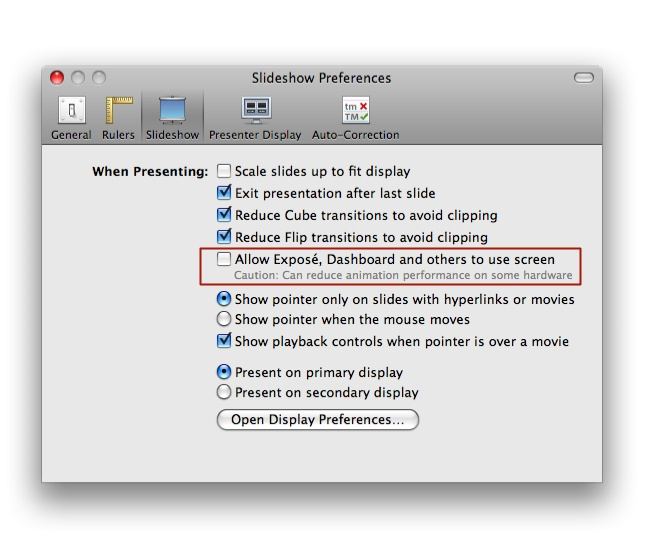
Durante l'esecuzione di una presentazione Keynote, potresti riscontrare l'apertura imprevista di varie applicazioni. Tra le applicazioni che potrebbero aprirsi vi sono Apple Software Update, Exposé, Front Row o qualsiasi applicazione configurata per utilizzare una sequenza di avvio programmata. Per evitare questo comportamento, disabilita la possibilità che altre applicazioni si aprano durante una presentazione nelle preferenze di Keynote.
Apri Keynote.
Apri la finestra Preferenze Finestra (Keynote > Preferenze...).
Seleziona il pannello Presentazione .
Deseleziona Consenti a Exposé, Dashboard e ad altri di usare lo schermo come mostrato nell'istantanea di seguito.