Listen to your identified songs in Apple Music or Apple Music Classical
When you subscribe to Apple Music, you can open and play your identified songs in the Music app  . You can also automatically add identified songs to a “My Shazam Tracks” playlist—or a playlist of your choice—in Apple Music.
Additionally, you can open and play songs that Shazam identifies as classical in the Apple Music Classical app  .
.
Note: If you’re not an Apple Music subscriber, you can hear previews of your identified songs in the Music app. See the Apple Support article Subscribe to Apple Music.
Open an identified song in Apple Music on iPhone or iPad
Go to the Shazam app
 on iPhone or iPad, then tap
  in the top-right corner of the home screen.
Make sure Shazam is connected to Apple Music, then tap
 to close settings.
Tap Library
 at the bottom of the screen, then do any of the following:
Tap
 on a song.
Tap
 on a song, then tap Listen in Music.
Touch and hold a song, then tap Listen in Music.
Tap a song, then tap Open in Apple Music in the track screen.
Tap
in the track screen, then tap Listen in Music.
The song opens in the Music app.
Sync your identified songs to a “My Shazam Tracks” playlist in Apple Music on iPhone or iPad
Go to the Shazam app
on iPhone or iPad, then tap in the top-right corner of the home screen.Turn on “Sync your songs to Apple Music.”
A “My Shazam Tracks” playlist is created in Apple Music. Your existing and newly identified songs are automatically added to the playlist.
Note: To sync songs to a “My Shazam Tracks” playlist in Apple Music when you identify songs with Control Center, Siri, or Shortcuts, the Shazam app must be installed on your device and “Sync your songs to Apple Music” must be turned on in Shazam app settings.
To find your playlist in the Music app
, tap Library at the bottom of the screen, tap Playlists, then scroll the list. Alternatively, you can tap  , enter “My Shazam Tracks,” then tap Library at the top of the screen.
Tip: If songs you’ve identified using the Shazam app don’t appear in the “My Shazam Tracks” playlist, turn off “Sync your songs to Apple Music,” then turn it on again.
Add an identified song to any Apple Music playlist on iPhone or iPad
Go to the Shazam app
on iPhone or iPad, then tap Library at the bottom of the screen.Do any of the following:
Tap
on any song, tap Add to a Playlist, then tap a playlist in Apple Music Playlists.Touch and hold a song, tap Add to a Playlist, then tap a playlist.
Tap a song, tap
 in the track screen, then tap a playlist.
Tap a song, tap
in the track screen, tap Add to a Playlist, then tap a playlist.Tap
in the top-right corner of the Library screen, tap  , select your songs, tap
  , then tap a playlist.
Note: Only playlists that you’ve created in the Music app appear in the list.
If you can’t add songs to a playlist, make sure Sync Library is turned on for Apple Music.
Tip: When you identify music that may help you focus or rest, add the songs to your own ambient playlist in Apple Music. You can then play your Apple Music playlist from one of four moods—Sleep, Chill, Productivity, or Wellbeing—within Ambient Music.
Open an identified song in Apple Music Classical on iPhone or iPad
If the Shazam app identifies a song as classical, you can open the song in the Apple Music Classical app.
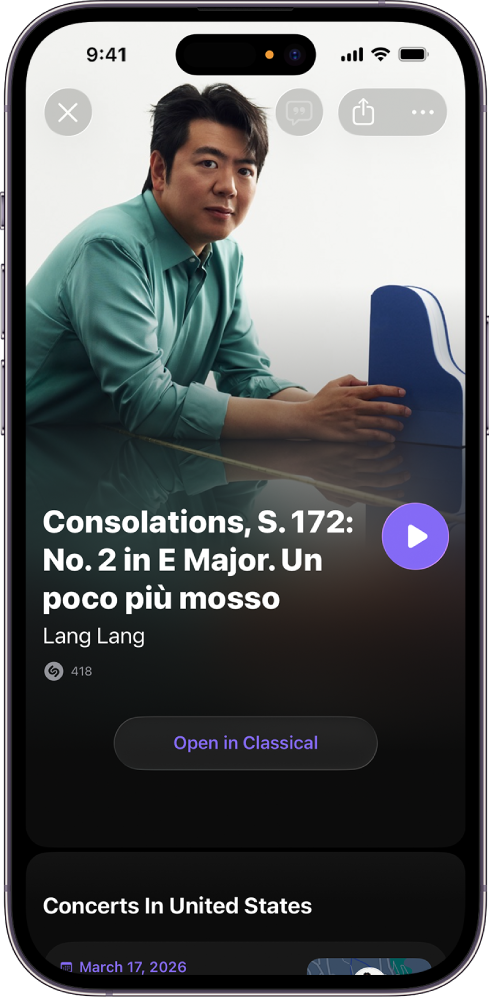
Make sure you’ve installed Apple Music Classical on your iPhone or iPad.
Go to the Shazam app
, then tap Library at the bottom of the screen.Do any of the following:
Tap a classical song, then tap Open in Classical in the track screen.
Tap
on a classical song, then tap Listen in Classical.Touch and hold a classical song, then tap Listen in Classical.
Tap
in the track screen, then tap Open in Classical.
The song opens in Apple Music Classical.
Open an identified song and create a “My Shazam Tracks” playlist in Apple Music on an Android device
Make sure the Apple Music app is installed on your Android device.
Go to the Shazam app
, then tap  (or swipe to the Library).
Tap
, then do either of the following:If Apple Music is set as your default music app: Tap Sync Shazam Library to Apple Music, sign in to your Apple Account, follow any onscreen instructions, then tap Back to Shazam.
If Apple Music isn’t set as your default music app: Tap “Open songs in other music apps” (or [music app name]), tap Apple Music
, tap Set default, tap “Turn on syncing,” sign in to your Apple Account, follow any onscreen instructions, then tap Back to Shazam.
A “My Shazam Tracks” playlist is created in Apple Music. Your existing and newly identified songs are automatically added to the playlist.
In your library, do any of the following:
Tap
on any song.Tap a song, then tap Apple Music in the track screen.
Tap
 on any song, then tap Open in Apple Music.
Open an identified song in Apple Music Classical on an Android device
If the Shazam app identifies a song as classical, you can open the song in the Apple Music Classical app.
Note: Before you can listen to music in Apple Music Classical, you must subscribe to Apple Music. Apple Music Classical is free with your Apple Music subscription.
Make sure you’ve installed Apple Music Classical and Apple Music on your Android device.
Go to the Shazam app
, then tap (or swipe to the Library).Do either of the following:
Tap
on a classical song, then tap Open in Classical.Tap a song, tap “Open song in” in the track screen, tap Classical, then tap Just Once.
The song opens in Apple Music Classical.
Tip: Check out the Shazam top 100 of all time or global weekly top 50 playlists in Apple Music.