View and manage your Apple Fitness+ library
In Apple Fitness+, you can use your library to keep a list of your favorite workouts, build a workout routine, or view downloaded workouts for staying active offline.
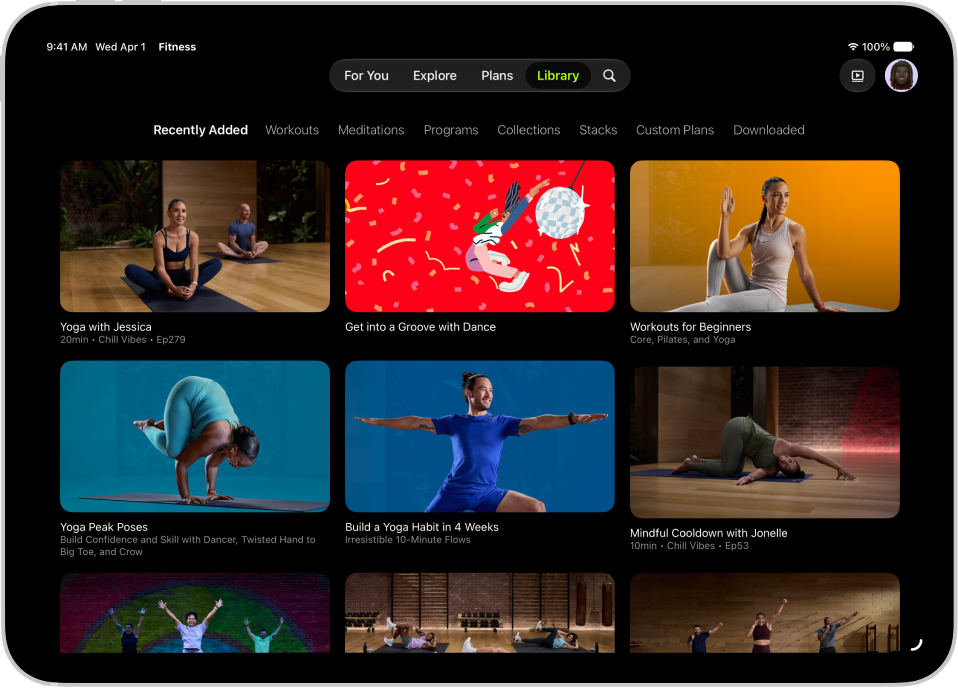
View items in your library
Go to the Fitness app
 on iPhone, iPad, or Apple TV 4K, then (on iPhone) tap Fitness+.
Do one of the following:
On iPhone or iPad: Tap Library.
On Apple TV 4K: Open the sidebar, then select Library.
Select a category to view all the items of that category you’ve added to your library.
Delete an item from your library
Go to the Fitness app
on iPhone, iPad, or Apple TV 4K, then (on iPhone) tap Fitness+.Do one of the following:
On iPhone or iPad: Tap Library.
On Apple TV 4K: Open the sidebar, then select Library.
Select a category, then select a workout, meditation, program, collection, or Stack.
Do one of the following:
On iPhone or iPad: Tap
 , then tap Delete from Library or Delete Stack.
On Apple TV 4K: Press and hold the clickpad or the touch surface on your remote, then select Delete from Library.
To delete a saved Stack on Apple TV 4K, select
, then select Delete Stack.