iTunes U User Guide for web

iTunes U for web roster details
You can use the roster panes to view and manage student enrollment in your private course, including sharing your course enrollment code, accepting, rejecting, and blocking students from your course, and importing students from an Apple School Manager class. For unaffiliated instructors, enrollment is limited to the first 50 students you approve.
You can also use the Admin | Enrollment pane to request a new enrollment code for your private course, if needed.
For all courses except managed courses, a course image is required before students can enroll. Use the Admin | Course Settings pane to add a course image.
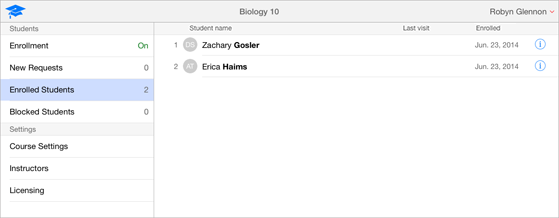
The following is an example of the students currently enrolled in a course in the Admin | Enrolled Students pane.
Thanks for your feedback.