
Systematic troubleshooting
Overview
Systematic troubleshooting provides a structured approach to solving technical issues with consistency and accuracy. It helps you provide precise, reliable user support by avoiding quick and incorrect conclusions that stem from familiarity, assumptions, or incomplete data. This method requires a deliberate process rather than reaching for quick conclusions.
A deductive process helps clarify what’s happening, why it’s happening, and how best to proceed. When you apply this approach alongside your organization’s standard procedures, you can help isolate an issue’s root cause. Using this method consistently contributes to effective and sustainable solutions.
Evaluating issues
As you evaluate an issue, consider information from the user, the device, and known resources. Next, narrow down the symptoms to hardware and operating system, access to services and organizational data, connectivity, or apps. Finally, use this data to investigate the issue, isolate root causes, and provide options for resolution.
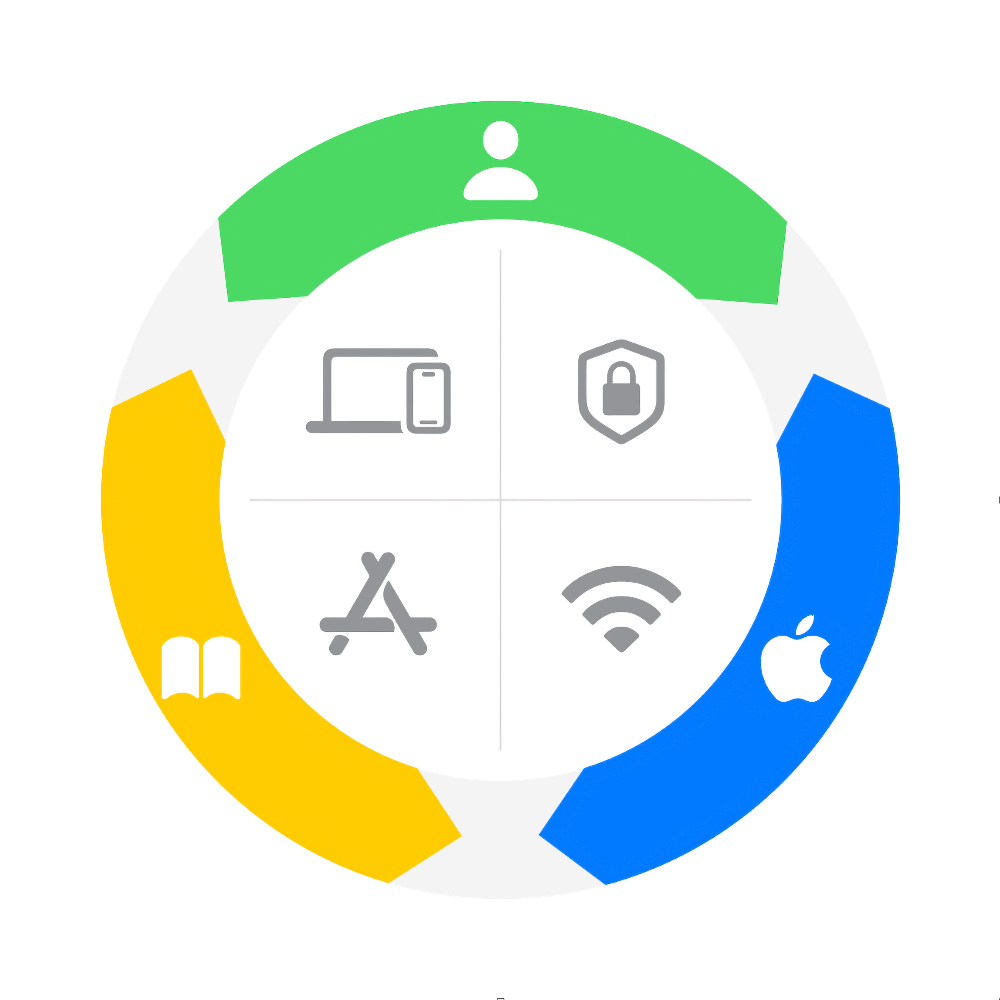
The outer ring shows three sources of information. Start with the user at the top and move clockwise:
User (green): What the person describes and has experienced
Device (blue): What you can see on the device, such as alerts, error messages, or unexpected behavior
Resources (gold): What you learn from internal documentation, processes, and external support articles
The center of the wheel shows the areas where symptoms can appear, clockwise from the top left:
Hardware and operating system
Access to services and organizational data
Connectivity
Apps
Understand
To understand an issue that a user brings to you, ask a mix of open- and closed-ended questions about device usage and history, the person’s experience, environmental factors such as location, and any perceived ideas about the issue.
Investigate
After agreeing on the user’s experiences with their device’s behavior, you can begin your investigation. What the user reports and what you find can differ, so treat their description as a starting point and let the evidence confirm or redirect it. Investigate the symptoms to determine the root cause. Symptoms are what the person experiences or observes. They can be both expected and unexpected behaviors, and you may find multiple symptoms. To determine the root cause—or what causes the symptoms—begin researching symptoms using internal (organizational) resources or external resources such as support articles, user guides, or technical papers.
Isolate
When you’ve determined several possible root causes of an issue, you can begin to isolate the causes. As you begin, be mindful of various technology layers in devices:
Hardware: Physical buttons, the display, speakers, wireless radios, ports, or any connected peripherals
Operating system: System behavior, settings, and file systems
Connectivity: Networks, access points, and wireless peripherals
Apps: Behaviors and settings related to apps
Services: Organizational resources such as backups, directory servers, or external services such as iCloud, the App Store, and other Apple services
Device management: Settings and functions that an organization’s device management service configures
User behavior or prior experience: How the user interacts with the device
Provide options
After narrowing down the possible root causes, reference internal and external resources to provide options for resolution. Start with low-effort steps before progressing to more meaningful steps that require high user effort.
Simple steps, such as restarting a device, confirming settings, running a diagnostics test, and confirming your organization’s system status, can help you quickly solve or identify root causes of issues. High-effort steps, such as resetting network or system settings, reinstalling software, or repairing devices, can be time-consuming.
Solution options can include providing support documentation, educating the user on the device or a process, reinstalling software or restoring the device to factory settings, and repairing or replacing the device.