If you can't send or receive messages on your iPhone or iPad
If iMessage doesn't work, you can't receive text messages, or you see an alert when you send a message, learn what to do.
Issues with Messages after you set up a new device
Not receiving messages on a device
Issues with photos or videos in messages
If you have issues with Messages after you set up a new device
If you experience issues like conversations in Messages showing up as separate threads or sent messages appearing as green message bubbles instead of blue message bubbles when you set up a new device, update your settings using the following steps:
Update your device to the latest version of iOS or iPadOS if needed.
In the Settings app, tap Cellular. Make sure that your phone line is turned on. If you use multiple SIMs, make sure that the phone number you want to use is selected and turned on.
In the Settings app, tap Messages. Turn iMessage off and then back on.
Tap Send & Receive.
Tap the phone number that you want to use with Messages.
If you have issues when you try to receive a FaceTime call after you set up a new device, you can also update your FaceTime settings.
Learn what to do if you can't sign into iMessage or FaceTime
Learn what to do if your messages are green
Learn what to do if you see a Waiting for Activation alert
If you see a red exclamation point
If you try to send a message and you a red exclamation point with an alert that says Not Delivered, follow these steps:
Check your network connection.
Tap the red exclamation point
, then tap Try Again.If you still can’t send the message, tap the red exclamation point
, then tap Send as Text Message. Messaging rates may apply.
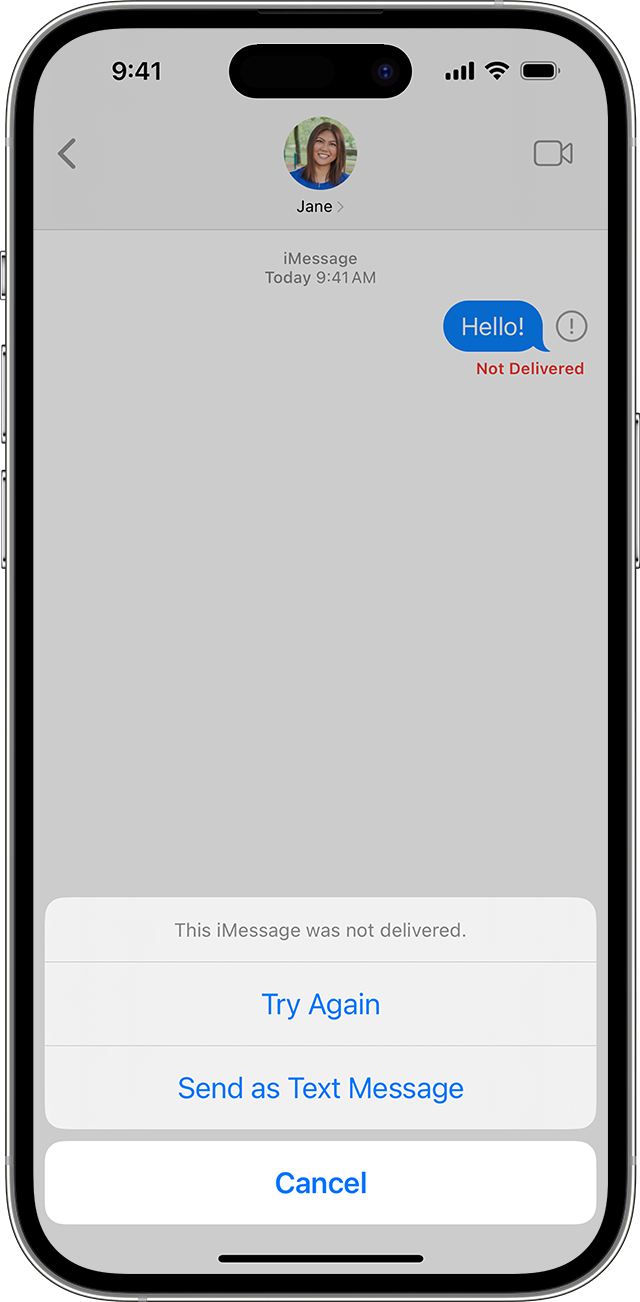
iMessages are texts, photos, or videos that you send to another iPhone, iPad, iPod touch, or Mac over Wi-Fi or cellular-data networks. These appear in blue bubbles. All other text messages use SMS or MMS and require a text-messaging plan. Those appear as green bubbles.
Contact your carrier if you can't send or receive SMS messages
You can set up Messages so that it automatically tries to send messages as an SMS when iMessage isn't available. Go to Settings > Messages, and turn on Send as SMS.
If you receive messages on one device but not the other
If you have an iPhone and another iOS or iPadOS device, like an iPad, your iMessage settings might be set to receive and start messages from your Apple ID instead of your phone number. To check if your phone number is set to send and receive messages:
In the Settings app, tap Messages.
Tap Send & Receive.
Choose the phone number or email address that you want to use with messages.
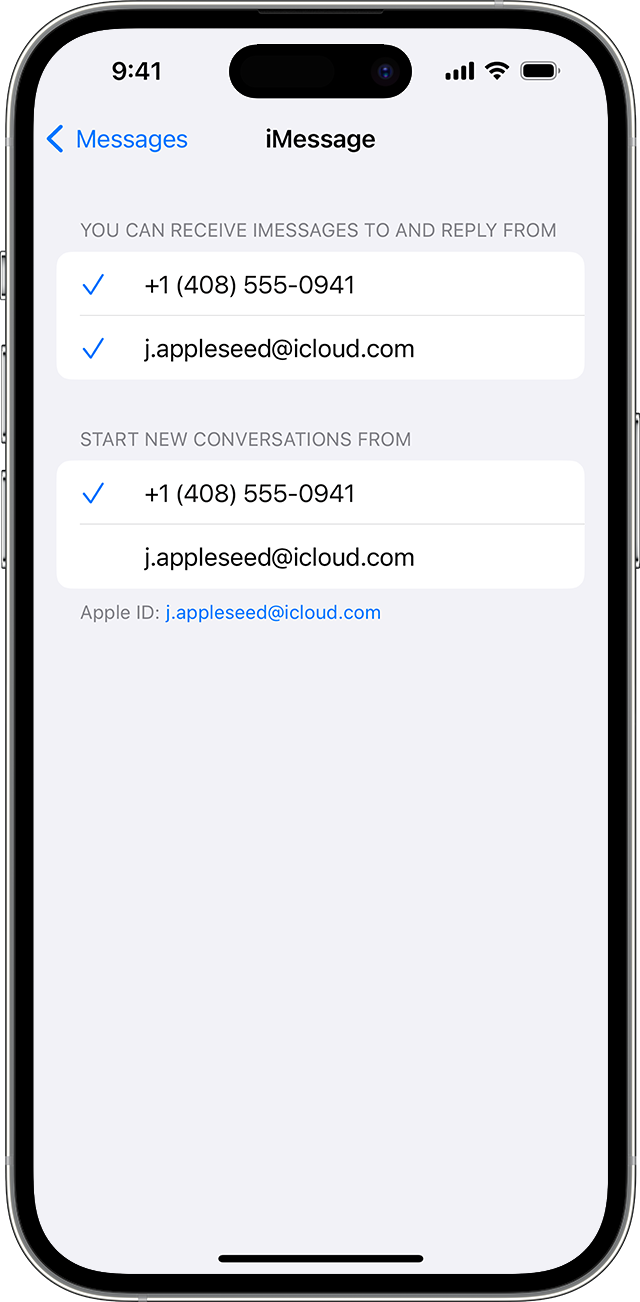
If you don't see your phone number, you can link your iPhone number to your Apple ID so you can send and receive iMessages from your phone number. You can also set up Text Message Forwarding so you can send and receive MMS and SMS messages on all of your Apple devices.
If you have issues with a group message
If you're in a group message and stop receiving messages, check to see if you left the conversation:
In Messages, tap the group message that you can't receive messages from.
If you see a message that says you left the conversation, then either you left the conversation or you were removed from the group message.
You can rejoin a group message only if someone in the group adds you. Learn how to add or remove people from group messages.
Open Messages and tap the Compose button
 .
.Enter the phone numbers or email addresses of your contacts.
Type your message, then tap the Send button
 .
.
If you have other issues with a group message, you might need to delete the conversation and start a new one. In iOS 16, iPadOS 16.1, and later, you can recover a message if you deleted it within the last 30 to 40 days.
If you can't send or receive photos and videos in messages
Make sure that your device has enough space to receive images and videos.
If you use SMS or MMS messaging to send photos or videos, your carrier may set size limits for attachments. Larger files may take more time to send, and your iPhone can compress photo and video attachments when necessary. If you experience an issue when you try to send full size images, you can manually send lower quality images:
In the Settings app, tap Messages.
Tap Low Quality Image Mode.
Other steps to try
Check your network connection. To send a message as iMessage or MMS, you need a cellular data or Wi-Fi connection. To send an SMS message, you need cellular network connection. If you turn on Wi-Fi Calling, you can send SMS messages over Wi-Fi.
Check with your carrier to see if the type of message you’re trying to send, like MMS or SMS, is supported.
If you’re trying to send group MMS messages on an iPhone, go to Settings > Messages and turn on MMS Messaging. If you don't see an option to turn on MMS Messaging or Group Messaging on your iPhone, then your carrier might not support this feature.
Make sure that you entered the correct phone number or email address for the contact.
Contact Apple Support if you still can't send or receive messages
Contact your carrier if you still can't send or receive SMS messages
Deactivate iMessage if you switched to a non-Apple phone and have issues with messaging


