MacBook Pro (15-inch, Late 2008), (17-inch, Early 2009), (15-inch and 17-inch, Mid 2009): How to set graphics performance
Learn how to adjust graphics performance for the MacBook Pro (15-inch, Late 2008), MacBook Pro (17-inch, Early 2009), and MacBook Pro (15-inch and 17-inch, Mid 2009) portable computers with NVIDIA 9400 and 9600 graphic cards.
The MacBook Pro (15-inch, Late 2008), MacBook Pro (17-inch, Early 2009), and MacBook Pro (15-inch and 17-inch, Mid 2009) portable computers include a feature in the Energy Saver pane of System Preferences. This pane is for adjusting graphics performance. You can select "Better battery life" or "Higher performance" as shown below.
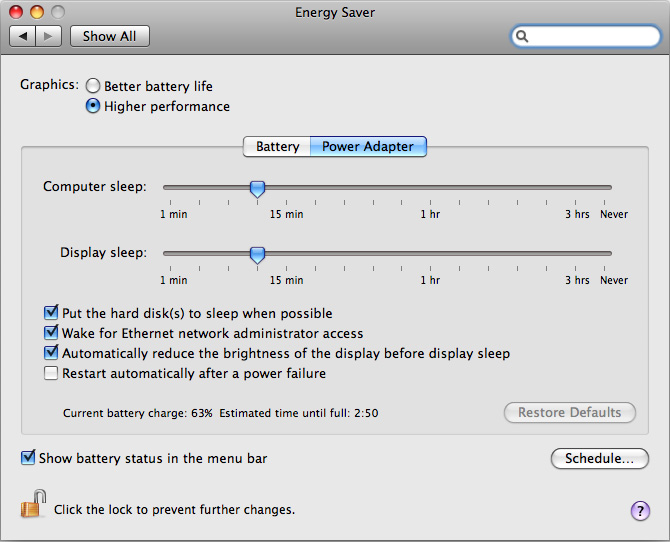
Select "Better battery life" for situations in which graphic-intensive applications are not being used, or use of the MagSafe Power Adaptor is limited.
Select "Higher performance" if playing games or carrying out other tasks which involve heavy graphics processing.
Learn more
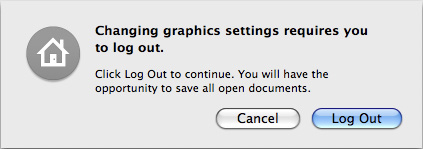
When choosing a different graphics setting in the Energy Saver system preference pane, you will be required to log out for the new settings to take effect. After clicking Log Out (shown in the message below), you will have an opportunity to save any open documents or other work.
By default, computers with the option to do so use the "Better battery life" option.
See MacBook Pro (15-inch, Late 2008) and MacBook Pro (17-inch, Early 2009): Cannot select GeForce 9400M graphics in Windows for more information about selecting graphics performance with Microsoft Windows.
If you are looking for information on Graphic Swithing for more recent Apple portables see MacBook Pro (15-inch, Mid 2010) and later, MacBook Pro (17-inch, Mid 2010) and later: How to set graphics performance.
Information about products not manufactured by Apple, or independent websites not controlled or tested by Apple, is provided without recommendation or endorsement. Apple assumes no responsibility with regard to the selection, performance, or use of third-party websites or products. Apple makes no representations regarding third-party website accuracy or reliability. Contact the vendor for additional information.
