iPhone、iPad、iPod touch でメールアカウントを追加する
iOS デバイスのメールアプリでメールアカウントを設定する方法は、自動と手動の 2 通りがあります。どちらの方法が適しているか、この記事を参考にご判断ください。
一般的なメールプロバイダを使用している場合は自動的に設定する
iCloud、Google、Microsoft Exchange、Yahoo などのメールプロバイダをお使いの場合は、メールアドレスとパスワードを入力するだけで、後は自動的にメールアプリでメールアカウントが設定されます。以下の手順を実行してください。
「設定」>「メール」の順に選択し、「アカウント」をタップします。
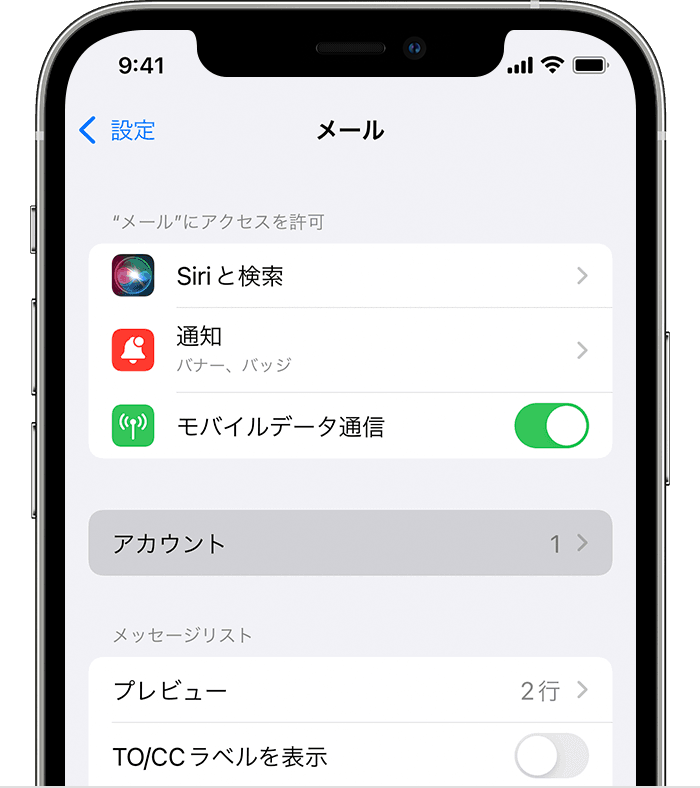
「アカウントを追加」をタップし、メールプロバイダを選択します。
メールアドレスとパスワードを入力します。
「次へ」と表示されたら「次へ」をタップし、アカウントが検証されるまで、しばらく待ちます。
「保存」と表示されたら「保存」をタップします。
リストに表示されるどのメールプロバイダが自分のメールアカウントに該当するかを確認する
ご利用のメールプロバイダが一般的ではない場合は「その他」を選択して手動で設定する
メールアカウントを手動で設定する必要がある場合は、アカウントのメール設定情報をご用意ください。設定がわからない場合は、こちらで調べるか、メールプロバイダにお問い合わせください。その上で、以下の手順を実行してください。
「設定」>「メール」の順に選択し、「アカウント」をタップします。
「アカウントを追加」をタップし、「その他」をタップして、「メールアカウントを追加」をタップします。
名前、メールアドレス、パスワード、アカウントの説明を入力します。
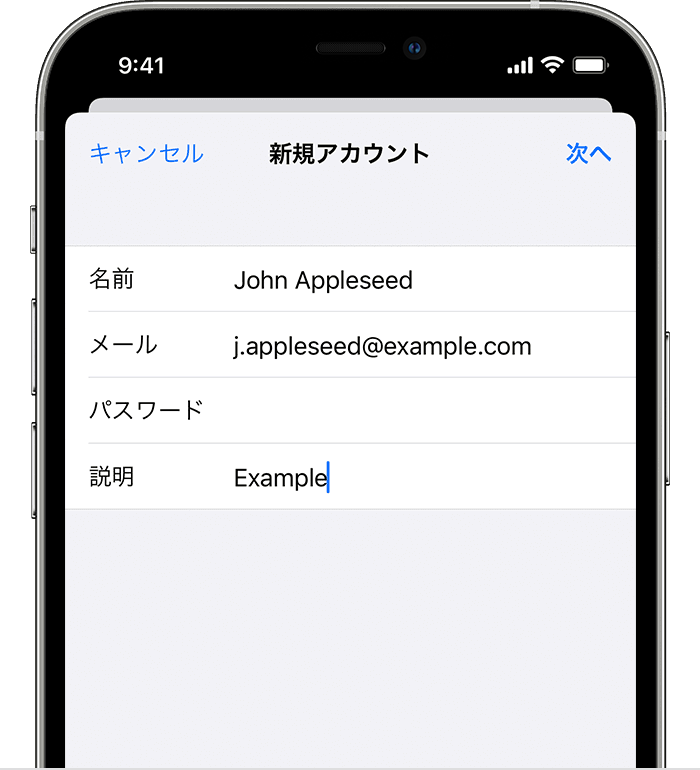
「次へ」をタップします。メールアプリは、メール設定を検索し、アカウントの設定を最後まで進められるか試します。メール設定が検出された場合は、「完了」をタップして、アカウントの設定を終わらせてください。
メールアプリでアカウント設定が自動検出されない場合
メール設定が検出されなかった場合は、手入力する必要があります。「次へ」をタップして、以下の手順を実行してください。
新しいアカウントについて「IMAP」または「POP」を選択します。どちらを選択すればよいかわからない場合は、メールプロバイダにお問い合わせください。
「受信メールサーバ」と「送信メールサーバ」の情報を入力して、「次へ」をタップします。情報が手元にない場合は、調べてみてください。
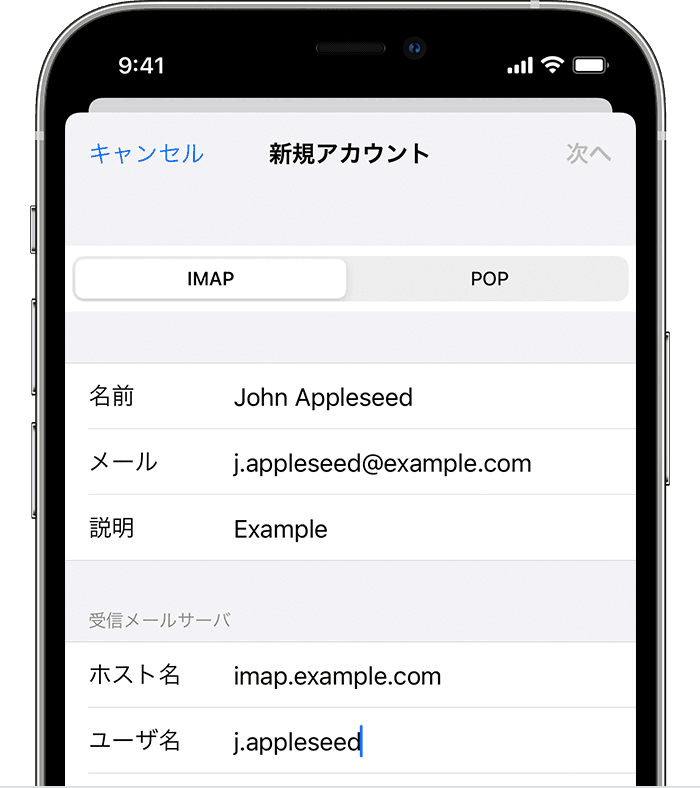
メール設定が正しい場合は、「保存」をタップすれば、設定が終わります。メール設定が正しくない場合は、編集するように案内されます。
依然としてメールアカウントを設定できない場合や、メール設定を保存できない場合は、メールプロバイダにお問い合わせください。
メールアプリでできる、もっといろんなこと
Apple が製造していない製品に関する情報や、Apple が管理または検証していない個々の Web サイトについては、推奨や承認なしで提供されています。Apple は他社の Web サイトや製品の選択、性能、使用に関しては一切責任を負いません。Apple は他社の Web サイトの正確性や信頼性についてはいかなる表明もいたしません。詳しくは各メーカーや開発元にお問い合わせください。


