How to find the serial number or IMEI for your Apple Watch
Learn where to find the serial number for your Apple Watch and the IMEI on Apple Watch GPS + Cellular models.
How to find the Serial Number or IMEI on your Apple Watch
On your Apple Watch, open the Settings app.
Tap General, tap About, then scroll down.
Look for Serial Number or IMEI.
How to find the Serial Number or IMEI using your iPhone
On your iPhone, open the Apple Watch app.
Tap the My Watch tab.
Tap General, then tap About.
Look for Serial Number or IMEI.
IMEI is available on Apple Watch GPS + Cellular models only.
Check the case of your Apple Watch
You can also find the serial number on your watch case. Learn how to identify your Apple Watch if you're not sure which model you have.
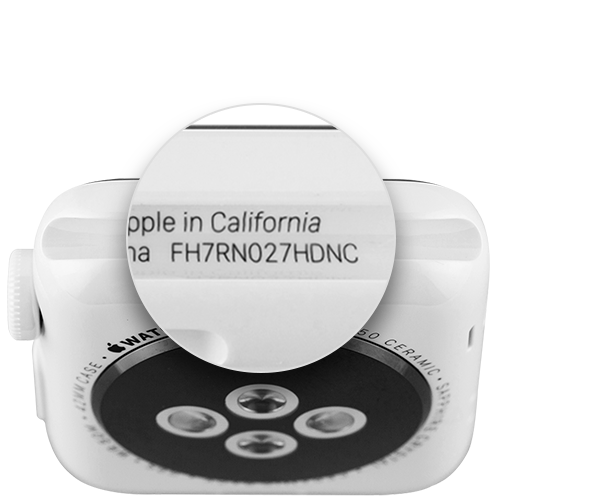
On Apple Watch Series 1 or later — including Apple Watch Hermès, Apple Watch Nike, Apple Watch SE and later, and Apple Watch Ultra and later — remove the band from your watch, then look inside the band slot.
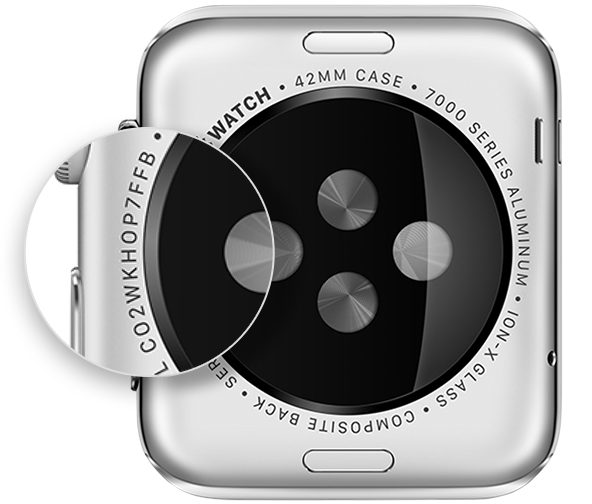
On Apple Watch (1st generation), check the back of your watch for the engraved serial number.