Take a tour of Studio Display
Your Apple Studio Display has the following features.
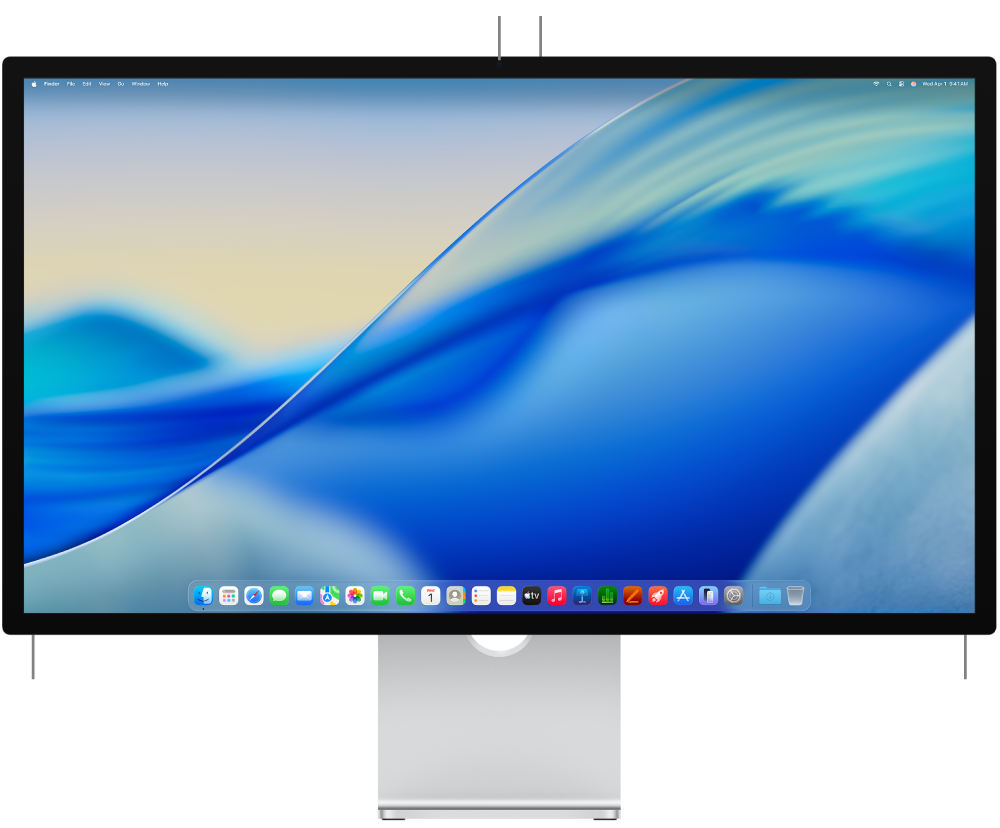
Display. Studio Display has a 27-inch display with 5K Retina resolution, which means you have plenty of room for working on projects, watching movies and TV shows, and browsing the web, all with outstanding image quality.
Camera. The 12MP Center Stage camera with support for Desk View keeps you looking your best when you’re onscreen. With Center Stage, your video calls are even more engaging. Center Stage adjusts the camera, making sure you stay front and center even as you move around or have others join the call. And Desk View lets you show an overhead view of your desk and your face at the same time. If the green indicator light next to the camera is glowing, the camera is on.
Speakers. Your Studio Display has an innovative six-speaker system so you can enjoy a full range of sound, creating a robust, high-quality audio experience with accurate mids and crisp highs.
The speakers also support Spatial Audio. With Spatial Audio, you can enjoy an immersive, theater-like environment while watching videos with Dolby Atmos, rock out like you’re in the front row when listening to songs on Apple Music, or feel like you’re in the room with your friends and family while on FaceTime.
Microphones. Three studio-quality microphones built into your Studio Display help you communicate and record audio with clarity.
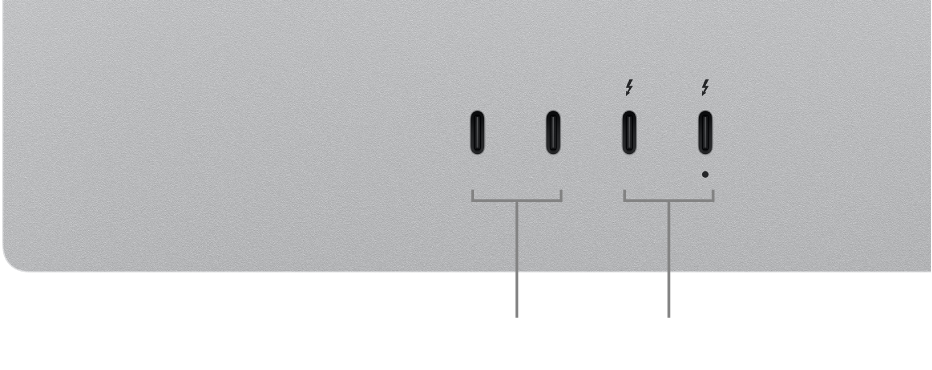
Thunderbolt 5 (USB-C) ports. There are two Thunderbolt 5 (USB-C) ports on your Studio Display: one upstream port for you to connect your Mac and one downstream port for connecting additional displays, storage, and networking. With Thunderbolt 5, you can transfer data at up to 80 Gb/s when connecting external storage devices.
Note: Both Thunderbolt ports are marked with the Thunderbolt icon 
USB-C ports. Connect and charge even more devices and accessories with the two additional downstream USB-C ports. You can transfer data at up to 10 Gb/s when connecting external storage devices.
600 nits of brightness. Studio Display can sustain up to 600 nits of brightness across the full screen. This means that you can comfortably read, browse, and watch videos at any time of day without constantly adjusting settings to see your content.
P3 wide color. A P3 wide color gamut provides a vibrant, true-to-life color palette so you can experience the full range of colors of images and video.
True Tone technology. True Tone automatically adapts the color of the display to match the light in your environment. Using an ambient light sensor, True Tone adjusts to your overall lighting environment, making your viewing experience feel natural. For more information, see Displays settings on Mac.
Reference modes. Studio Display includes several built-in reference modes (known as presets) that cover typical content creation workflows across several media types. You can use the reference modes included with your display to match the production requirements of HDR video, digital photography, print media, and other content types. Each reference mode sets the color space, white point, gamma, and brightness on your display. You can also create custom reference modes to tailor them to your specific workflow needs by setting the color gamut, white point, luminance, and transfer function operations. For more information, see Use the Preset menu in Displays settings and Create custom reference modes in the Mac User Guide.
Note: The Studio Display undergoes a state-of-the-art factory display calibration process to ensure a high degree of color accuracy. Color professionals who use a workflow tuned to a particular calibration instrument can recalibrate the Studio Display. See Customize the calibration using the Pro Display Calibrator in the Mac User Guide.