Take a screenshot on Apple Watch
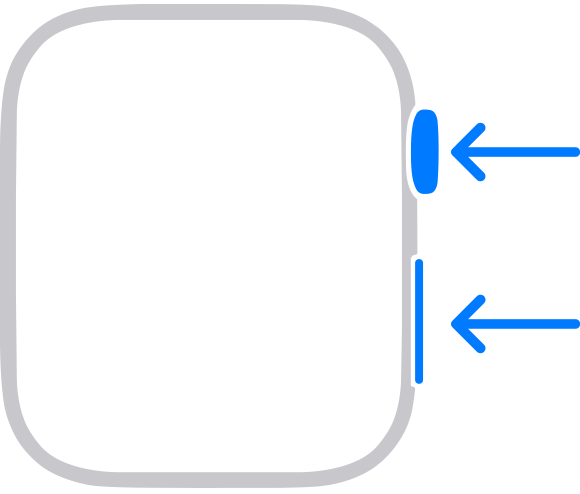
You can capture the screen on your Apple Watch using the Digital Crown and the side button.
How to turn on screenshots on your Apple Watch
Open the Apple Watch app on your iPhone.
Tap the My Watch tab, then tap General.
Scroll down, then turn on Enable Screenshots.
You can also do this on your Apple Watch:
Open the Settings app on your Apple Watch.
Tap General, then tap Screenshots.
Turn on Enable Screenshots.
How to take a screenshot on your Apple Watch
With two fingers, press the Digital Crown and the side button at the same time. The screen flashes when you take a screenshot.
Open the Photos app on your iPhone to view the screenshot.
If you've set up an Apple Watch for a family member
You can turn on screenshots for an Apple Watch that you've set up for a family member:
Open the Settings app on your family member's Apple Watch.
Tap General, then tap Screenshots.
Turn on Enable Screenshots.
When your family member takes a screenshot on their Apple Watch, the screenshot is saved to the Photos app on their Apple Watch and sent to your iPhone. To view the screenshot on your iPhone, follow these steps:
Open the Apple Watch app on your iPhone.
Tap All Watches, tap your family member's Apple Watch, then tap Done.
Tap General, then tap Diagnostic Logs.
Tap a screenshot to view it. To save or share the screenshot, tap the Share button
 , then choose a way to share.
When you use the Workout app, pressing both the Digital Crown and the side button will also pause your workout. Press both buttons again to resume your workout.
