About the LTE options on your iPhone
The cellular-data options on your iPhone might vary based on your carrier's network.
If your carrier supports VoLTE
On your iPhone, go to Settings > Cellular > Cellular Data Options and tap Enable LTE or Settings > Mobile Data and tap Enable LTE. If your carrier supports Voice over LTE (VoLTE), you'll see these options:
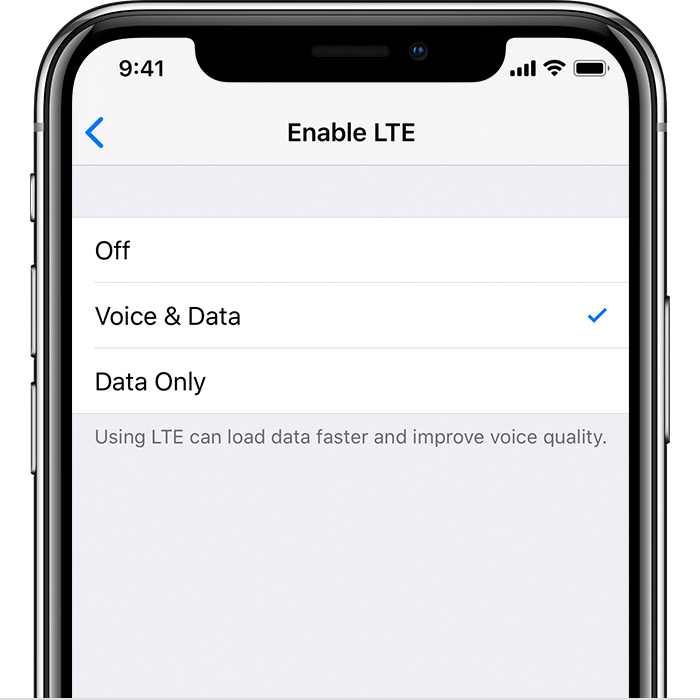
Off: Turns off LTE
Voice & Data: Allows voice calls and cellular-data use over LTE
Data Only: Allows cellular-data use, but not voice calls over LTE
If your carrier doesn't support VoLTE
If your carrier doesn't support VoLTE and is a GSM carrier, you'll see one of these options:
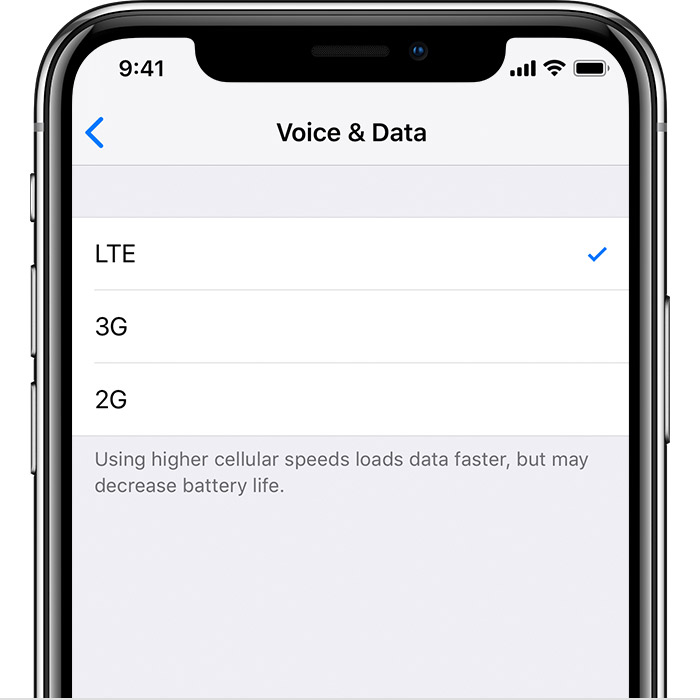
LTE or 4G: Allows cellular-data use over the LTE or 4G network when available.
3G: Allows cellular-data use over the 3G network when available.
2G: Allows cellular-data use over the 2G network when available.
Depending on the wireless carrier, 4G can indicate either a UMTS or LTE connection. If your carrier doesn't support VoLTE and is a CDMA carrier, you'll only see an option to Enable LTE. This allows cellular-data use over the LTE network when available.
Learn more about cellular data networks.