If you can't view your iTunes Extras
Get help when you can't view or play iTunes Extras while watching a movie that you bought from the Apple TV app or iTunes Store.
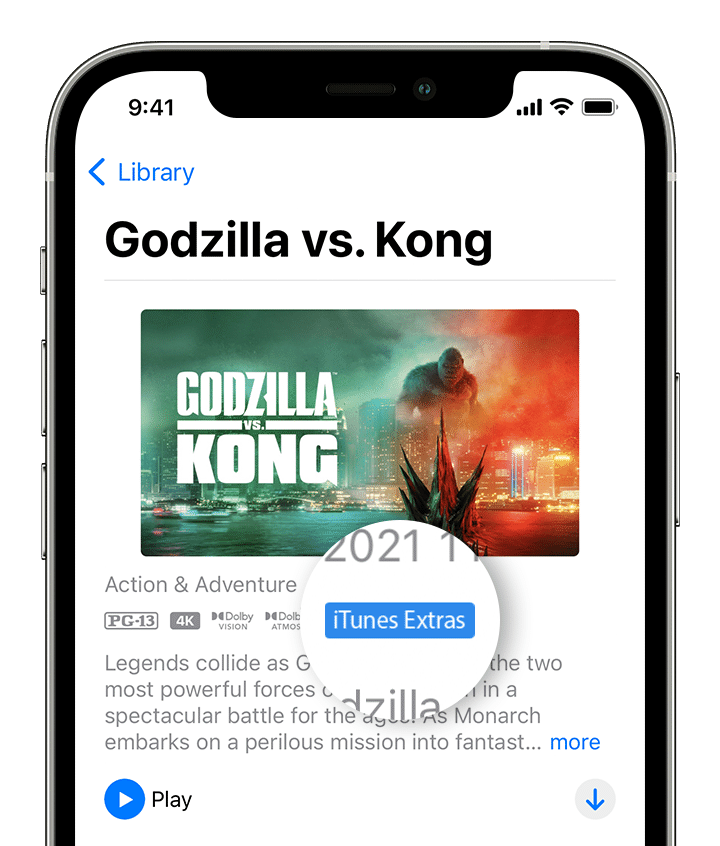
If a movie has iTunes Extras, the iTunes Extras badge appears on the movie's description page in the Apple TV app or iTunes Store.
You can watch iTunes Extras in the Apple TV app on an iPhone, iPad, iPod touch, Mac, and Apple TV. Or in iTunes for Windows on a PC.
To access iTunes Extras on an iPhone, iPad, or iPod touch, tap the screen while viewing the media in landscape mode, then tap Extras in the playback controls.
iTunes Extras aren't available in certain countries and regions. Learn about what's available in your country or region.
Make sure that you have a strong Internet connection
Connect your device to a Wi-Fi network and try again. If you're using an iPhone or iPad with a cellular connection, make sure that cellular data is turned on for the Apple TV app in Settings.
Check if the movie has iTunes Extras
On your iPhone, iPad, iPod touch, Mac, or Apple TV, open the Apple TV app, then go to the Library tab.
On a PC, open iTunes for Windows, select Movies from the menu in the upper-left corner, then select the Library tab.
Select a movie to open its description page. If a movie has iTunes Extras, there is an iTunes Extras badge.
If you didn't buy the high definition (HD) version of the movie, or if you rented the movie, then the movie won't have iTunes Extras.
iTunes Extras aren't available in the Apple TV app on smart TVs and streaming devices.
Update your software
On your iPhone or iPod touch, update to the latest version of iOS.
On your iPad, update to the latest version of iPadOS.
On your Mac, update to the latest version of macOS.
On your Apple TV, update to the latest version of tvOS.
On a PC, make sure that you're using the latest version of iTunes for Windows.
Get more help
If you still can't view your iTunes Extras, you can report a problem with your purchase.
If you bought the movie before July 10, 2014
If you bought a movie with iTunes Extras before July 10, 2014, you might also be able to download a version of the original iTunes Extras (if available) from the iTunes Store on a Mac or PC with iTunes.
When you download iTunes Extras, they appear as a separate item in your Library.
Need more help?
Tell us more about what's happening, and we’ll suggest what you can do next.