Use Voice Control on your iPhone, iPad, or iPod touch
With Voice Control, you can navigate and interact with your device using your voice to tap, swipe, type, and more.
You need iOS 13 or later, or iPadOS to use Voice Control. Before you can use Voice Control, a file download is required. Once the download is complete, you don't need a Wi-Fi connection to use Voice Control. It's recommended that you connect to Wi-Fi before you turn on Voice Control for the first time.
Voice Control isn't available in all countries or regions. Voice Control uses the Siri speech recognition engine for U.S. English only.
How to turn on Voice Control
Go to Settings and select Accessibility.
Select Voice Control, then select Set up Voice Control. A download will begin in the background.
When the download is complete, a microphone will appear in the status bar of your device that indicates that Voice Control is listening or not listening.
How to use Voice Control
When Voice Control is turned on, you can speak commands just like you would perform an action by touch. For example, to access Spotlight Search on the Home screen, say “Swipe down.” Or to access long-press menus for certain apps, say “Long press [app name].” Voice Control doesn’t change how your device responds to touch.
To see a list of available commands for different situations, say “Show me what to say.”
To view the full list of available commands, follow these steps:
Go to Settings and select Accessibility.
Select Voice Control, then Customize Commands.
Learn more about customizing the commands for Voice Control.
Here are a few other things you can do with Voice Control
To turn Voice Control on or off after the initial setup, you can use "Hey Siri," the Accessibility Shortcut, or go to Settings, select Accessibility, then select Voice Control.
To lock your device, say "Lock screen."
To wake your device, say "Hey Siri, turn on Voice Control."
To activate listening, you can say "Go to sleep" or "Wake up." The listening feature doesn't turn off, but puts the microphone to sleep until you wake your device with a command.
How to interact with your screen
To interact with items on your screen, speak an action, such as “Tap” then speak the name of the item. For example, say “Tap Accessibility.”
Show names
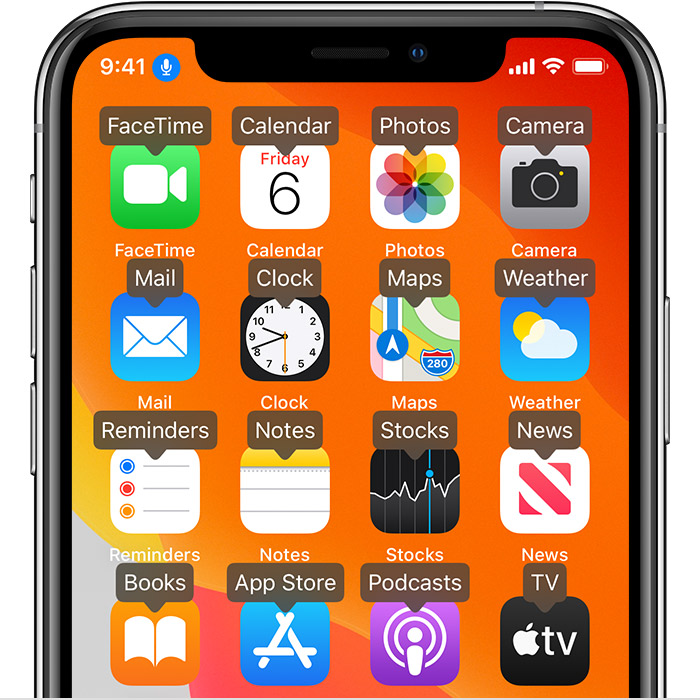
If you’re not sure what the name of the item is, you can say, “Show names” to display an overlay with the item names.
Show numbers
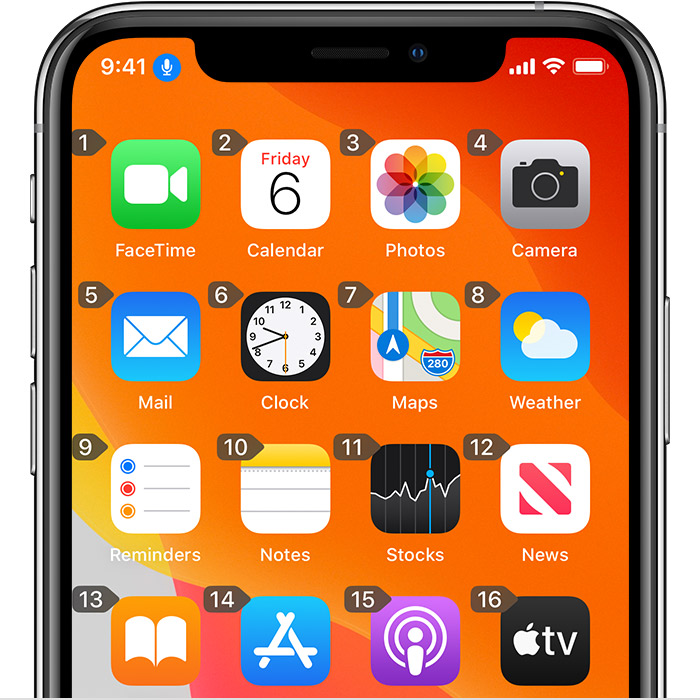
If an item doesn’t have a name, or if you would prefer to use numbers instead, you can say, “Show Numbers” to display numeric tags for each item on your screen.
Show grid
For interactions that require more precision or spacial referencing, you can say, “Show grid” to display a numbered grid overlay. Speaking a number on the grid will enlarge that area of the grid and present a new set of numbers, which will make it easier for you to select an item. The grid can also be used when dragging items on screen to identify where you would like to drop them, or when performing gesture or freehand actions.
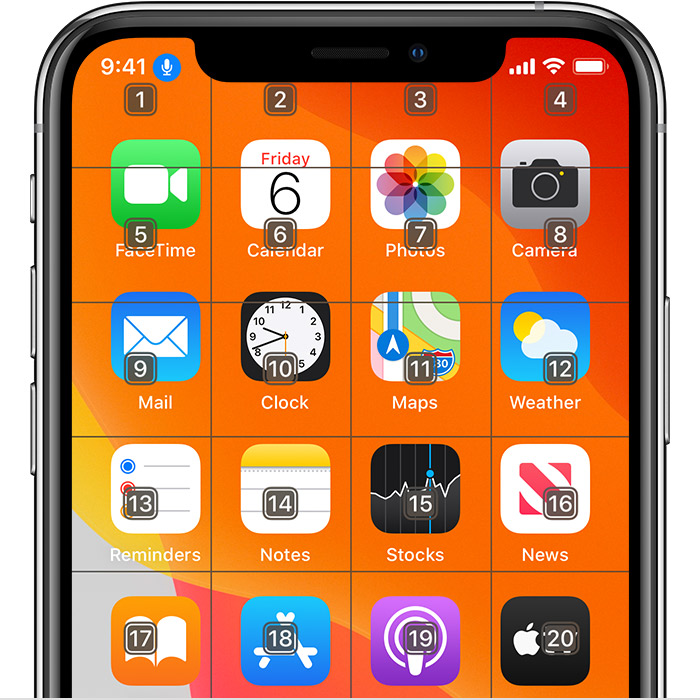
After speaking your next command, the grid will disappear. To keep the grid onscreen for multiple commands, say “Show grid continuously.”
Here are a few other things you can do to interact with your screen
To hide overlays, say “Hide [names, numbers, grid].”
To repeat actions, such as taps and swipes, say “Repeat that.” You can also specify how many times to repeat an action. For example, you can say “Swipe right. Repeat that three times.”
To return to a previous screen or menu, say, “Go back.”
How to customize Voice Control settings
You can customize several settings under Voice Control. Here’s a list of some of the settings you can adjust:
Language: Voice Control uses the the primary language that you have set on your iPhone or iPod touch.
Customize Commands: Shows you the full list of available commands, allows you to turn commands off, or create customized commands.
Vocabulary: Allows you to teach Voice Control new words.
Show Confirmation: Displays a visual confirmation at the top of the screen when a command is recognized.
Play Sound: Plays a sound effect when a command is recognized.
Show Hints: Displays dynamic suggestions for what you can say. These appear automatically after instructions are spoken that are similar, but don’t quite match the system commands.
Overlay: Allows you to set a continuous onscreen overlay with numbers, names, or the grid.
Attention Aware: On devices with Face ID, this setting allows you to turn listening on or off based on whether or not you’re looking at the screen. This is helpful when using multiple devices with Voice Control.
Learn more about Voice Control
Learn more about using Classic Voice Control.