Mac mini (Mid 2011): External ports and connectors
Learn about the external ports and connectors on your Mac mini (Mid 2011) computer.
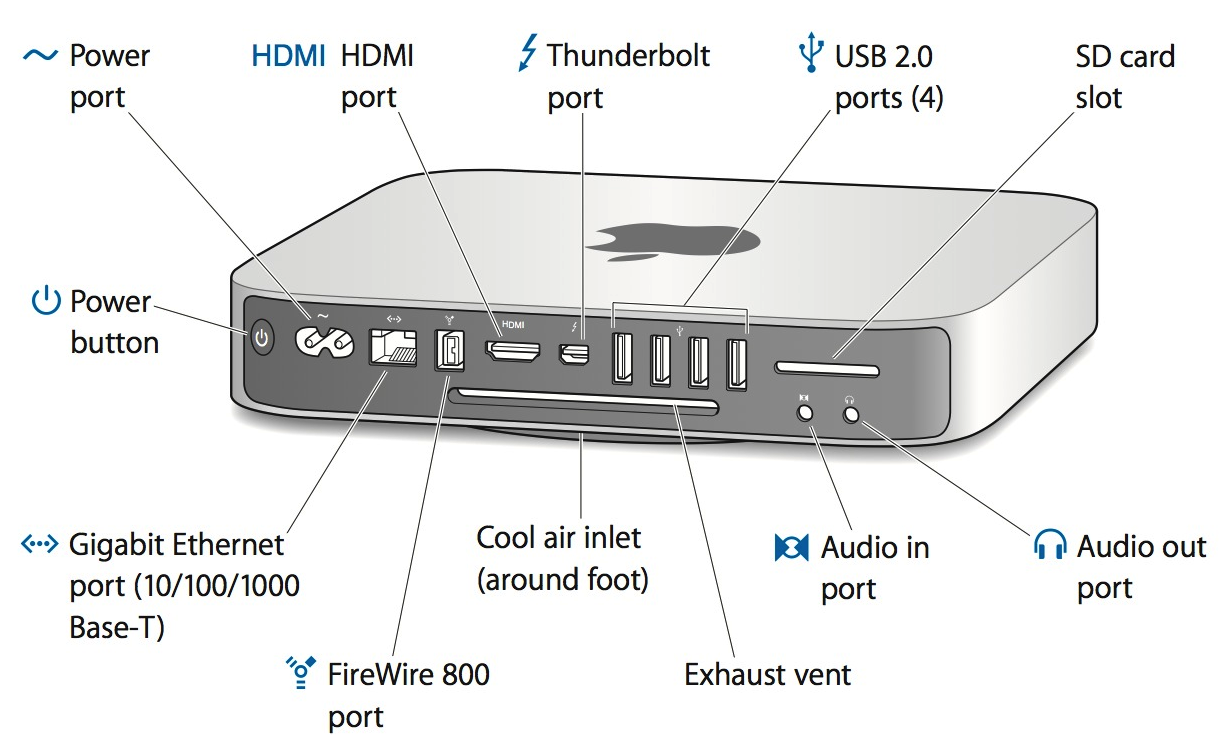
Note: All ports and connectors discussed in this article are located on the Input/Output (I/O) panel on the back of the computer.
Power port | This port is for connecting the Mac mini (Mid 2011) built-in power supply. This connector has different design than previous Mac mini models. |
Gigabit Ethernet port (10/100/1000 Gigabit Base-T) | Mac mini (Mid 2011) has a built-in 10/100/1000 Gigabit Ethernet port. Connect to an Ethernet cable from a cable or DSL modem, hub, switch, or router, or to another Mac computer; the Ethernet port also supports jumbo frames. The connected device can be a 10Base-T, 100Base-TX, or a 1000Base-T device; the port automatically detects which type of device is connected. You don't have to use an Ethernet crossover cable to connect to other Ethernet devices. |
One FireWire 800 port | Mac mini (Mid 2011) features one 800 Mbit/s FireWire (IEEE 1394b) port; 8 watts. 800 Mbit/s is a theoretical maximum load, and actual rates may vary. This port is used by older iPods and other devices such as video cameras or external hard drives or optical drives. |
HDMI port | Use the HDMI port to connect a compatible HDMI display or DVI display using the included HDMI to DVI adapter. Use extended desktop or video mirroring mode up to 1920 by 1200 pixels through this port. |
Thunderbolt port | Mac mini (Mid 2011) has a Thunderbolt port that supports:
Connect a Thunderbolt device using the Apple Thunderbolt Cable (2 m). |
Four USB (Universal Serial Bus) 2.0 ports | Mac mini (Mid 2011) has a total of four USB 2.0 compliant ports. You can connect USB 2.0- and USB 1.1-compliant devices to these ports. The USB ports use USB Type A connectors, which have four pins each. The USB 2.0 ports support low-speed, full-speed, and high-speed data transfers at up to 1.5 megabits per second (Mbit/s), 12 Mbit/s, and 480 Mbit/s, respectively. |
SD card slot | The built-in SD card slot allows the Mac mini (Mid 2011) to read and write data to SD media. The slot accepts cards that are Standard SD (Secure Digital) 4 MB to 4 GB, SDHC (Secure Digital High Capacity) 4GB to 32 GB, and SDXC (Secure Digital Extended Capacity) 32 GB and larger. |
Audio in/optical audio in port | The Audio In port accommodates both digital optical input and analog audio input. Analog audio line input is accepted through a 3.5mm mini phone jack. The sound input port accepts line-level stereo signals up to 24-bit stereo 44.1-192kHz sampling rate. It also accepts a stereo miniplug-to-RCA cable adapter for connecting stereo equipment to the computer. Optical audio input is SPDIF format and uses a standard TOSLINK cable with a TOSLINK mini-plug adapter, accepting up to 24-bit stereo and 44.1-96kHz sampling rate. |
Headphone out/optical audio out port | The headphone / line output port accommodates digital optical audio output, analog audio output with a 24-bit, 44.1-192 kHz D/A converter, digital audio output up to 24-bit stereo and 44.1-192 kHz sampling rate and supporting encoded digital audio output (AC3 and DTS). For analog headphone / line output, use a standard audio cable with 3.5mm metal plug. For digital audio, you can use Apple iPhone headset with microphone or a standard TOSLINK cable with a TOSLINK mini-plug adapter. |