Use Crash Detection on iPhone or Apple Watch to call for help in an accident
If your iPhone or Apple Watch detects a severe car crash, your device can help connect you to emergency services.
iPhone and Apple Watch models that work with Crash Detection
Crash Detection works on these iPhone and Apple Watch models:
iPhone 14 or later (all models) with iOS 16 or later
Apple Watch Series 8 or later, Apple Watch SE (2nd generation), and Apple Watch Ultra or later with watchOS 9 or later
Crash Detection requires a satellite connection for Apple Watch Ultra 3, cellular connection, or Wi-Fi calling with an internet connection from your Apple Watch or nearby iPhone. You can use cellular models of Apple Watch to make an emergency call in many locations, provided that cellular service is available. Some cellular networks may not accept an emergency call from your Apple Watch if your Apple Watch isn’t activated, if it isn’t compatible with or configured to operate on a particular cellular network, or if isn’t set up for cellular service, or if the cellular network does not support emergency calling over IMS. Learn more about Apple Watch GPS + Cellular.
Satellite features aren’t available in all countries and regions. Learn more about satellite features and their availability.
How Crash Detection on your iPhone and Apple Watch works
Crash Detection is designed to detect severe car crashes — such as front-impact, side-impact, and rear-end collisions, and rollovers — involving sedans, minivans, SUVs, pickup trucks, and other passenger cars.
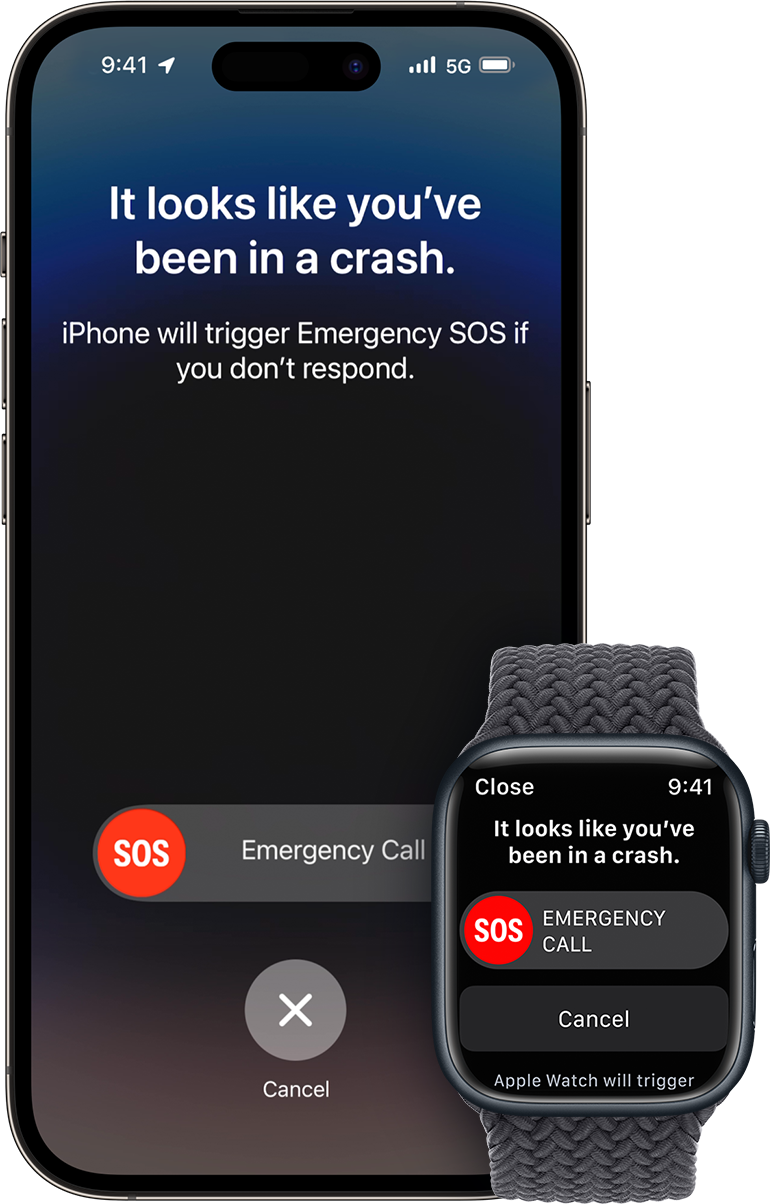
When a severe car crash is detected, your iPhone or Apple Watch sounds an alarm and displays an alert for 10 seconds.1
Your iPhone reads the alert, in case you can’t see the screen. If you have only your phone, the screen displays an Emergency Call slider and your phone can call emergency services.
Your Apple Watch chimes and taps your wrist, and checks in with you on the screen. If you have only your watch, the screen displays an Emergency Call slider. If you have a watch with cellular or your watch is connected to Wi-Fi, it can call emergency services.
If you have your iPhone and Apple Watch, the Emergency Call slider appears only on your watch, and the call is connected and the call audio plays from your watch.
If you’re able, you can choose to call emergency services or dismiss the alert.
If you’re unable to respond, your device automatically calls emergency services after a 30-second countdown.
If you've added emergency contacts, your device sends a message to share your location and let them know that you've been in a severe car crash.2
If you've set up your Medical ID, your device displays a Medical ID slider, so that emergency responders can access your medical information.
If the vehicle has its own integrated way to detect a crash and make a call, that process will proceed without change. Crash Detection won't cancel any emergency calls already in progress on your iPhone. Crash Detection will cancel ongoing, non-emergency calls on your iPhone or Apple Watch.
Set up your device for an emergency
On supported iPhone and Apple Watch models, Crash Detection is turned on by default. You can also follow these steps to make sure that your device is able to share the information that your emergency contacts and emergency responders need.
To alert your emergency contacts and share your Medical ID with emergency responders, set up your Medical ID and your emergency contacts in the Health app.
To share your location with your emergency contacts, turn on Location Services for Emergency SOS: On your iPhone, tap Settings, then tap Privacy & Security. Tap Location Services, then tap System Services, and make sure Emergency Calls & SOS is turned on.
Make an emergency call on your iPhone or Apple Watch after a severe car crash
Your iPhone or Apple Watch can connect you to emergency services after a severe car crash, even if you’re unresponsive.3,4
If you have iPhone 14 or later (all models), Crash Detection notifications to emergency services may be communicated by the Emergency SOS via satellite system when you're outside of cellular and Wi-Fi coverage, where Emergency SOS via satellite is available. Learn more about Emergency SOS via satellite.
If you're able to respond
If you need to contact emergency services, swipe the Emergency Call slider on the screen of your device. Your device makes the call to emergency services, and you can speak to a responder.
If the call has been made, but you don’t need emergency services, don’t hang up. Wait until a responder answers, then explain that you don’t need help.
If you're unresponsive
If you haven’t initiated a call or canceled the alert after 10 seconds, your device begins another 30 second countdown. During this countdown, your device makes loud whoops to get your attention. Your iPhone aggressively vibrates and flashes LED lights, and your Apple Watch makes aggressive taps.
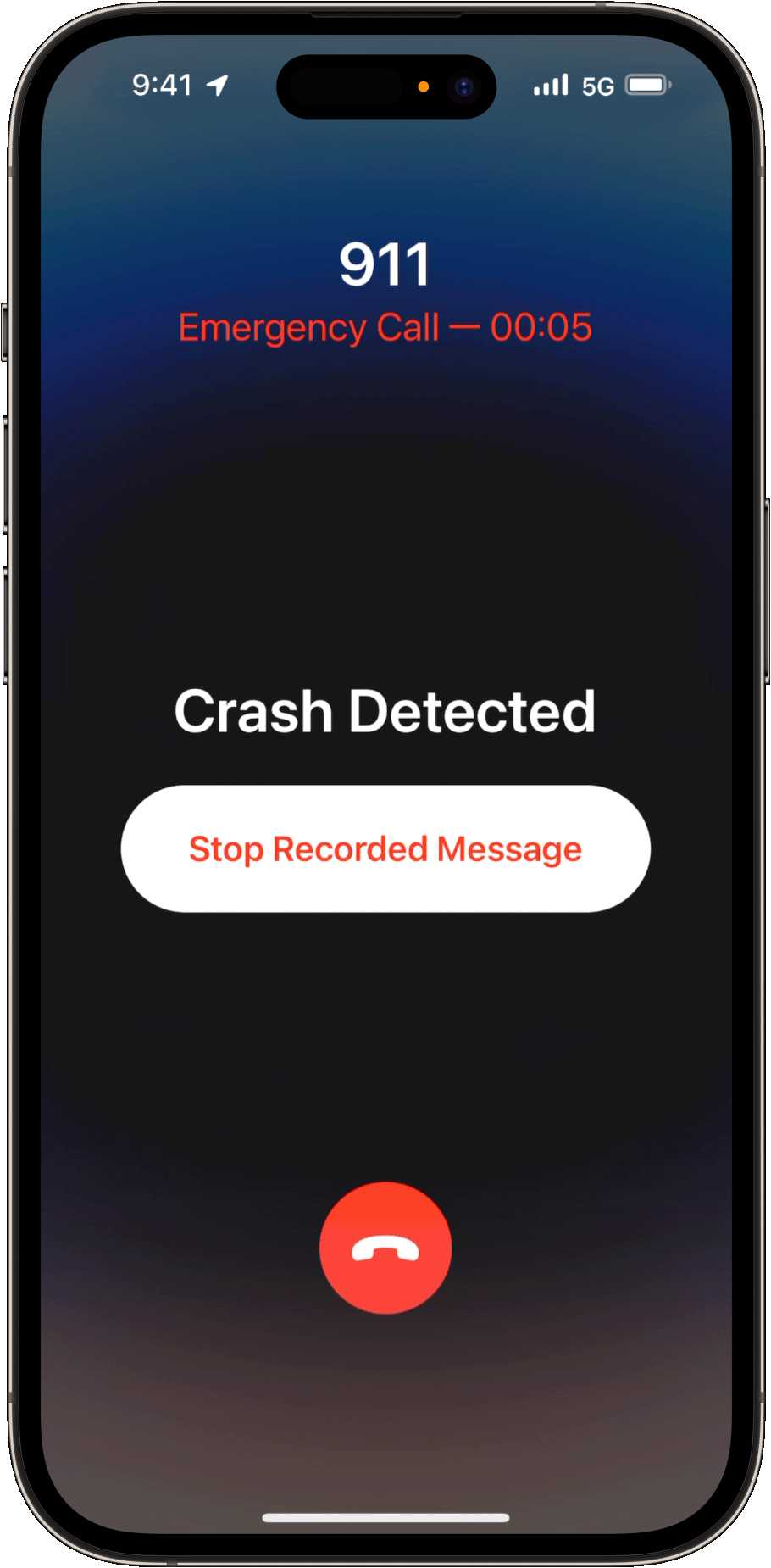
If you still haven’t responded, your device makes a call to emergency services at the end of the countdown. If you've added emergency contacts, your device sends a message to share your location and let them know that you've been in a severe car crash.
When your device makes this automatic call, it plays a looped audio message to emergency responders and out loud over your device speakers. This message informs emergency services that your Apple device detected a severe car crash and that you're unresponsive. It also shares your estimated latitude and longitude coordinates with a search radius.
The message plays in the primary language of the country that you're in and repeats at five second intervals. After the first time, it plays at a reduced volume, so that you or someone nearby can talk on the call to the emergency responder. You can also stop the recorded message.
Turn Crash Detection off
You can turn off alerts and automatic emergency calls after a severe car crash. When you turn off these alerts and calls on one of your paired devices, you automatically turn them off on your other paired devices.
On your iPhone
Open the Settings app.
Tap Emergency SOS.
Turn off Call After Severe Crash.
On your Apple Watch
On your iPhone, open the Apple Watch app.
In the My Watch tab, tap Emergency SOS.
Turn off Call After Severe Crash.
Crash Detection and privacy
Sensor data from your devices is used to detect severe car crashes. All sensor data used to detect severe car crashes is processed on device and discarded after a crash is detected, unless you agree to share your data to improve Crash Detection. For example, the microphone on your iPhone is used to detect loud sound levels, characteristic of crashes. If you agree to share your data to improve Crash Detection, the sound levels are shared with Apple. Raw audio is never collected or stored for the purposes of Crash Detection or to improve Crash Detection.
If your iPhone or Apple Watch detects a severe car crash and contacts emergency services, it will include your device location as latitude and longitude coordinates. The call will share your location regardless of whether you have enabled Location Services.5
Crash Detection cannot detect all car crashes.
If you use Emergency SOS, your emergency contacts will not be automatically notified if the Messages app is not the selected text messaging app or is deleted.
If you're unresponsive and there are multiple emergency numbers in your country or region, a single emergency number will be automatically dialed.
In specific regions, once the emergency call connects, the local emergency system might require a manual input, such as “Press 1 for….“ In those very rare instances, the menu option cannot be automatically selected for you to complete emergency service notification, but your emergency contacts will still be notified.
Location sharing with emergency services varies by country and region, and may not be available everywhere.