Use the Radeon Pro W6900X MPX Module with your Mac Pro (2019)
Find out about the many different display setups you can use with MPX Module on your Mac Pro (2019).
The Radeon Pro W6900X MPX Module contains an AMD Radeon Pro W6900Xgraphics processing unit (GPU) with 32 GB of GDDR6 memory, 4 Thunderbolt 3 ports and 1 HDMI 2.0 port. You can use the Thunderbolt 3 ports to connect displays and external devices to your Mac Pro, and also use the Thunderbolt 3 ports on the top* and rear of your Mac Pro to connect additional displays.
If you use Boot Camp and install a third-party graphics card from AMD, you may need to use different AMD drivers in Windows.
About ports and buses

The MPX module has two buses for its Thunderbolt 3 ports. If you connect 2 5K or 6K displays to the Thunderbolt 3 ports on your MPX module, connect 1 display per bus.
If you connect a display to the HDMI port on your MPX module, the Thunderbolt 3 ports on Bus 0 can support one additional display at 4K or lower resolution. If you need to output audio to a display connected to the HDMI port and have other displays connected over Thunderbolt 3, don't connect a display to the Thunderbolt 3 port next to the HDMI port.
Connect displays to a single Radeon Pro W6900X MPX Module
If you install a single Radeon Pro W6900X MPX Module, you can connect up to 6 displays using Thunderbolt 3 in these configurations.
3 Pro Display XDRs with resolutions of 6016 x 3384 at 60 Hz connected as follows:
One display on Bus 0
One display on Bus 1
One display on a Thunderbolt 3 port at the top* or rear (Apple I/O card) of your Mac
3 5K displays with resolutions of 5120 x 2880 at 60 Hz connected as follows:
One display on Bus 0
One display on Bus 1
One display on a Thunderbolt 3 port at the top* or rear (Apple I/O card) of your Mac
6 4K displays with resolutions of 3840 x 2160 at 60 Hz connected as follows:
Two displays on Bus 0
Two displays on Bus 1
2 displays on the Thunderbolt 3 ports at the top* or rear (Apple I/O card) of your Mac
Connect displays to two Radeon Pro W6900X MPX Modules
If you install 2 Radeon Pro W6900X MPX Modules, you can connect up to 12 displays using Thunderbolt 3 in these configurations.
6 Pro Display XDRs with resolutions of 6016 x 3384 at 60 Hz connected as follows:
Two displays: one on Bus 0 of each card
Two displays: one on Bus 1 on each card
One display on a Thunderbolt 3 port at the top* of your Mac
One display on a Thunderbolt 3 port at the rear (Apple I/O card) of your Mac
6 5K displays with resolutions of 5120 x 2880 at 60 Hz connected as follows:
Two displays: one on Bus 0 of each card
Two displays: one on Bus 1 on each card
One display on a Thunderbolt 3 port at the top* of your Mac
One display on a Thunderbolt 3 port at the rear (Apple I/O card) of your Mac
12 4K displays with resolutions of 3840 x 2160 at 60 Hz connected as follows:
One display on each Thunderbolt 3 port
Connect the Infinity Fabric Link
If you install 2 Radeon Pro W6900X MPX Modules, you can connect them using Infinity Fabric Link for increased performance and faster data transfer between the GPUs:
Remove the caps from each MPX module.
Align the connectors on the Infinity Fabric Link bridge with the connectors on the MPX modules, then slowly press it in.
Use a Phillips head screwdriver to turn both screws to the right, into the locked position.
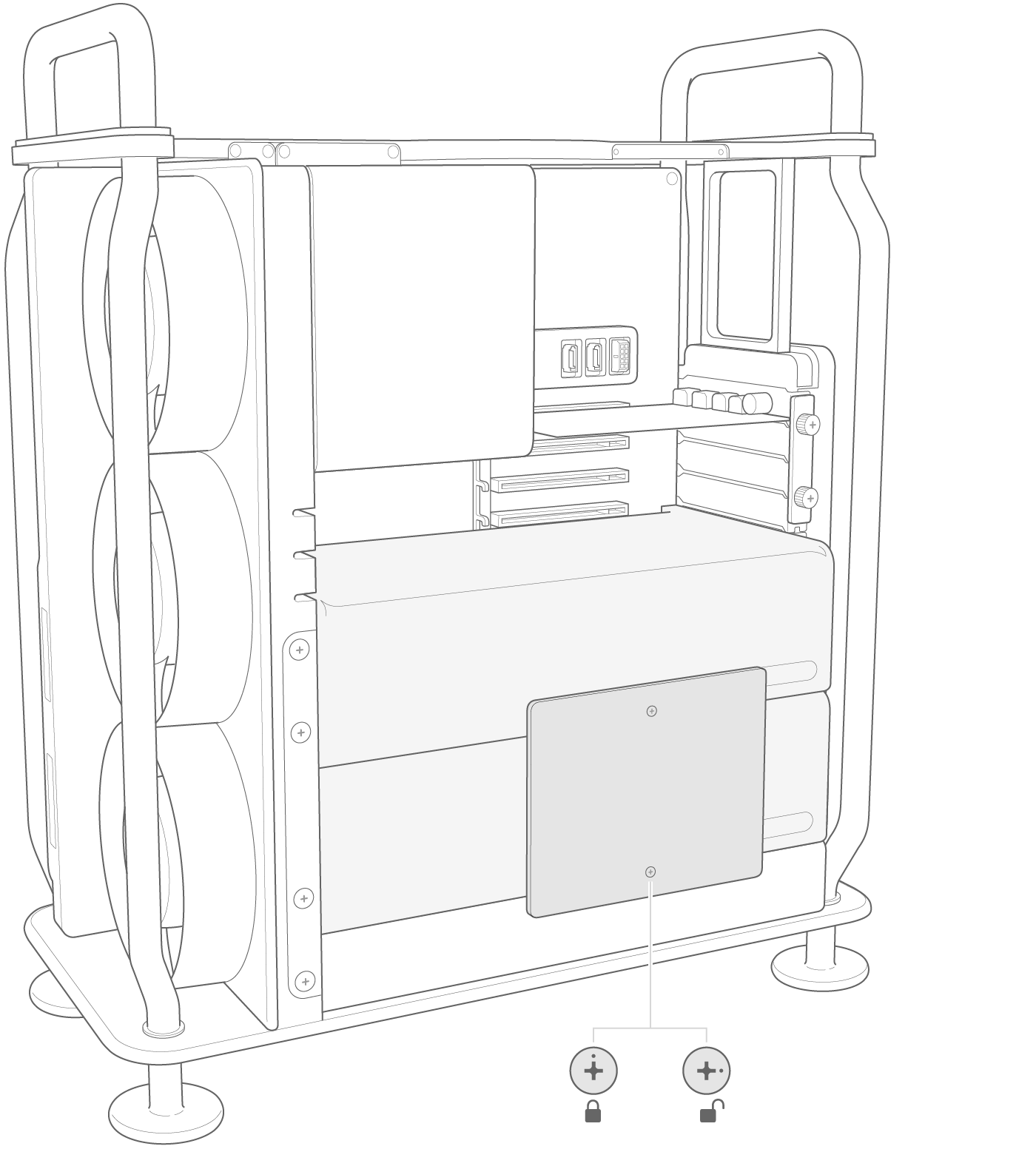
Infinity Fabric Link bridge for Radeon Pro W6900X MPX Module (Model A2666) isn't compatible with previous-generation Radeon Pro MPX Modules.
If you use Boot Camp and have the Infinity Fabric Link bridge installed, the Thunderbolt 3 ports on Bus 1 and the top* of your Mac Pro can't be used to connect displays.
Learn more
* On rack-mounted models, there are 2 Thunderbolt 3 ports on the front of Mac Pro.