
Add mathematical equations in Pages on iPad
You can include mathematical expressions and equations in your document. To add an equation, you compose it in the Pages equation dialog using LaTeX commands or MathML elements, then insert it into your document.
When you add an equation in a word-processing document, you can choose to place it inline with the text, so that it sits on the same line and moves with the text as you type, or place it as a floating object on the page so you can position it anywhere. In a page layout document, new equations are always added as floating objects on the page.
In either word-processing or page layout documents, you can add equations inline with the text inside text boxes or shapes.
Add an equation with LaTeX or MathML
Go to the Pages app
 on your iPad.
Open a document, then do one of the following:
Place the equation inline with text: Place the insertion point in some text, a text box or shape, or a table cell, or select the text you want the equation to replace.
Place the equation so it can be moved freely: Tap the corner of the page to make sure nothing is selected. You can also tap the page thumbnail in Page Thumbnails view.
Place the equation in a page header or footer: Tap the corner of the page (so nothing is selected), tap
 , then tap Document Options. Tap Document Setup, tap the Document tab, tap More Options, then tap in a header or footer.
Tap
 , then tap Add Equation.
Enter a LaTeX or MathML equation using the keyboard and the math symbols above the keyboard.
On iPad, some keys have multiple characters at the top. To type one of these characters, touch and hold the key, then swipe diagonally left or right. For example, to enter a left bracket, touch and hold the H key, then swipe down and to the right.
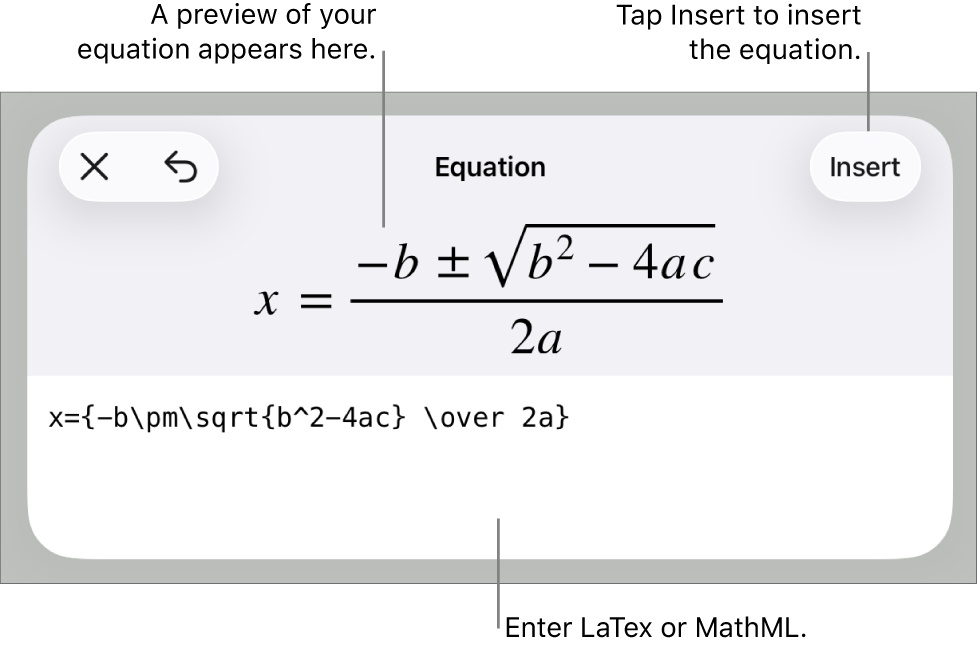
Tap Insert.
If you added the equation inline, it appears at the insertion point (or replaces the selected text). The equation is the same size and color as the surrounding text. If you change the size and color of the surrounding text, the size and color of the equation also change.
If you added the equation to the page, it appears at the center of the screen and has a default size and color that you can change by tapping
 . You can also drag a handle on the selected equation to change its font size. Drag the equation to reposition it on the page.
Edit, delete, or move an inline equation with LaTeX or MathML
After you add an equation inline with text, you can modify it.
Go to the Pages app
on your iPad.Open a document with an inline equation, then do one of the following:
Edit an equation: If the equation is in body text or a table cell, double-tap the equation, make your changes, then tap Update.
If the equation is in a page header or footer, tap the corner of the page (so nothing is selected), tap
, then tap Document Options. Tap Document Setup, tap the Document tab, tap More Options, then double-tap the equation.Move an inline equation within the text: Select the equation and drag it to a new position. Equations in the header or footer can be moved within the header or footer when your document is in Document Setup view. You can also drag the equation to another text box or shape.
Change the size, color, or alignment of an equation: Tap the equation, tap
, then adjust the controls to change the size and color of the equation.Copy an equation: Tap the equation, tap Copy, place the insertion point where you want to paste the equation—in a table cell or in a page header or footer—then tap Paste. You can also select an object on the page (such as a shape), then tap Paste to paste the equation as a free-floating object on the page.
Delete an equation: Select the equation, then tap Delete.
Edit, delete, or move a floating equation with LaTeX or MathML
After you add a floating equation to the page, you can modify it.
Go to the Pages app
on your iPad.Open a document with a floating equation, then do one of the following:
Edit an equation: Double-tap the equation, make your changes, then tap Update.
Move an equation: Drag it to a new location on the page.
Change the size, color, or alignment of an equation: Tap
, then adjust the controls in the Style or Arrange tab. You can also drag a handle on the selected equation to change its font size.Copy an equation: Tap the equation, tap Copy, scroll to the page where you want to place the equation, then tap Paste. You can also place the insertion point in a table cell or in a page header or footer, then tap Paste to paste the equation as an inline object.
Delete an equation: Select the equation, then tap Delete.
Move a floating equation inline with text: In a word-processing document, tap the equation, tap
, tap the Arrange tab, then tap Move with Text. Select Inline with Text in the Text Wrap section, then drag the equation to its final location.In a page layout document, cut and paste the floating equation into a text box or shape. See Place objects inline with text in a text box or shape.