Buy additional app features with in-app purchases and subscriptions
Learn how subscriptions and in-app purchases work.
What are in-app purchases?
In-app purchases are extra content or subscriptions that you buy inside an app. Not all apps offer in-app purchases. To check if an app offers in-app purchases before you buy or download it, find it in the App Store. Then look for "In-App Purchases" near the app's price or Get button.
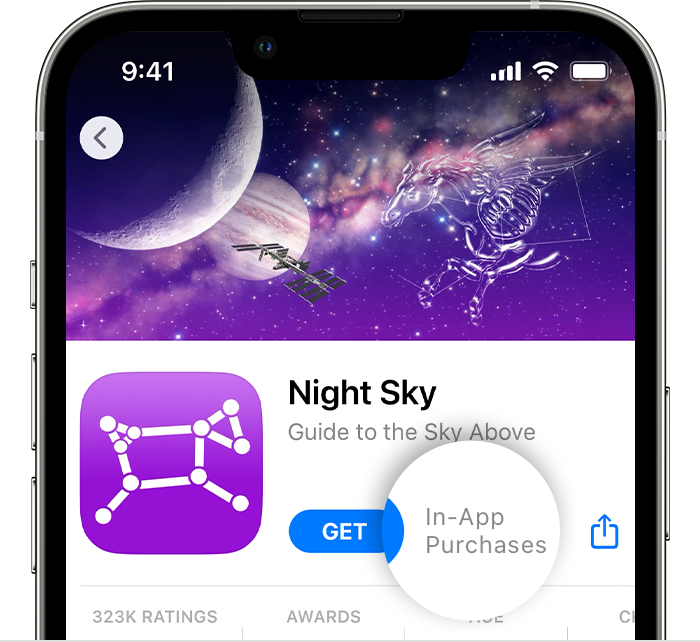
There are three types of in-app purchases — subscriptions, non-consumable purchases, and consumable purchases.
What is a subscription?
With a subscription, you pay to access content from an app or service for a period of time. For example, you might subscribe to Apple Music on a monthly basis. Subscriptions include services that you sign up for in an app, such as a video or music streaming service.
Most subscriptions renew automatically unless you cancel them. With some apps and services, you can choose how often the subscription renews. For example, you might be offered weekly, monthly, quarterly, or yearly subscriptions.
See a list of your subscriptions or cancel a subscription
What is a non-consumable in-app purchase?
Here are examples of non-consumable in-app purchases:
Remove ads
Full game unlock
Upgrade to pro edition
Bonus game levels
You buy these items one time, and you can transfer them to other devices that are associated with your Apple ID. If you lose a non-consumable purchase, you might be able to restore it for free.
What is a consumable in-app purchase?
Here are examples of consumable in-app purchases:
Game currency, such as coins or gems
Extra health points in a game
A package of exports to a new file format
You need to buy these items every time you want them, and you can't download them again for free. If you remove and reinstall an app or install an app on a new device, you might lose your consumable purchases. For example, if you install a game on your iPad that you started playing on your iPhone, the game levels sync, but extra health that you bought on your iPhone doesn't sync.
About sharing in-app purchases
If you use Family Sharing, you might be able to share some subscriptions with family members. Consumable in-app purchases can't be shared.
Find out how to share an Apple subscription with a family member
For more information about subscriptions and in-app purchases, see the Apple Media Services Terms and Conditions.
Store availability and features might vary by country or region. Learn what's available in your country or region.
