Restart the Apple Mobile Device Service (AMDS) on Windows
If an iPhone, iPad, or iPod touch isn’t recognized in iTunes on Windows, AMDS may need to be restarted.
How to restart AMDS
You might see the following error when connecting your device: "This [device] cannot be used because the Apple Mobile Device Service is not started."
Follow these steps to restart AMDS:
Close iTunes and disconnect any iPhone, iPad, or iPod that's currently connected.
Access the Run command by simultaneously pressing the Windows logo key and the R key on your computer's keyboard.
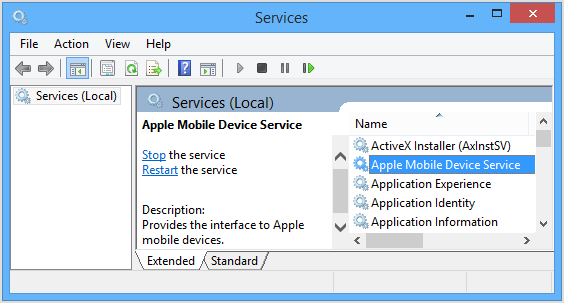
Type services.msc and click Ok. The services console should open.
Right-click on Apple Mobile Device Service and click Properties in the shortcut menu.
Set the Startup type pop-up menu to Automatic.
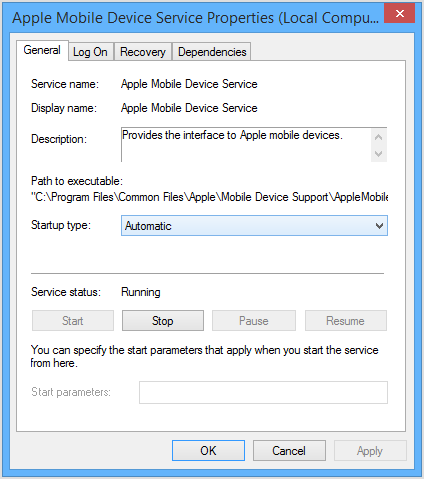
Click Stop the service.
After the service has stopped, click Start the service.
Click Ok.
Restart the computer.
Open iTunes and connect the device.
Learn more
If AMDS still will not start, or if it stops unexpectedly, this could be caused by third-party security software. Learn how to resolve issues between iTunes and third-party security software.
If AMDS isn't the issue, learn how to troubleshoot other causes for device recognition issues.
Information about products not manufactured by Apple, or independent websites not controlled or tested by Apple, is provided without recommendation or endorsement. Apple assumes no responsibility with regard to the selection, performance, or use of third-party websites or products. Apple makes no representations regarding third-party website accuracy or reliability. Contact the vendor for additional information.