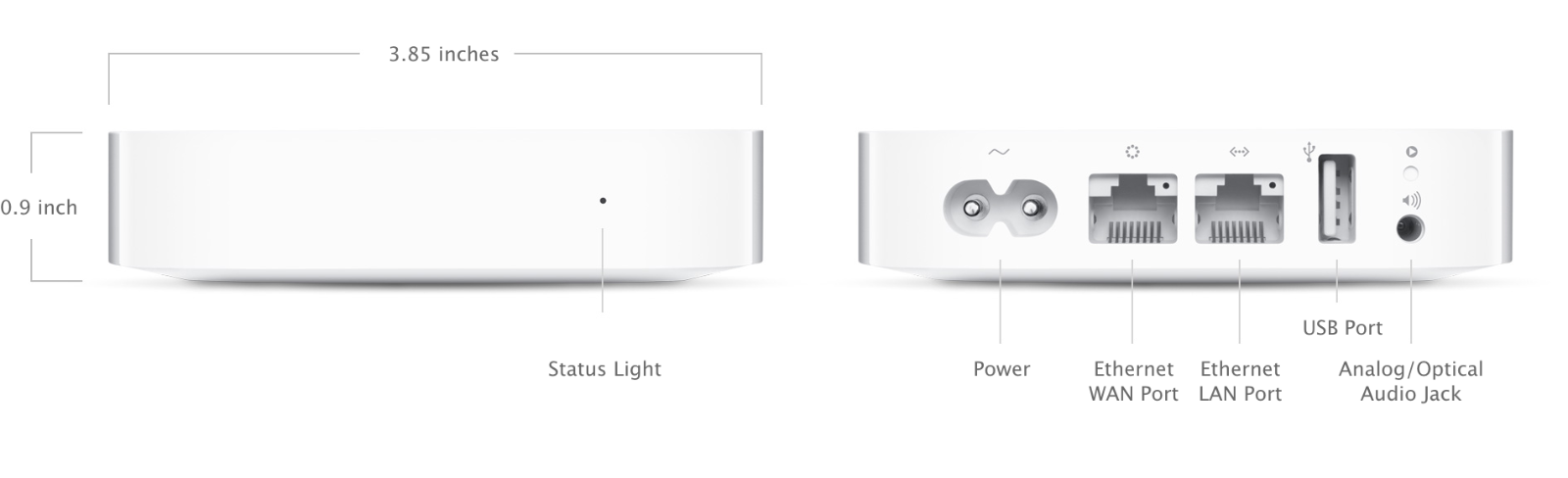
AirPort Express 802.11n (2nd Generation) - Technical Specifications
Size and Weight
Dimensions: 3.85 inches (98 mm) by 3.85 inches (98 mm) by 0.9 inch (23 mm)
Weight: 8.5 ounces (240 grams)1
Wireless
IEEE 802.11a/b/g/n
Simultaneous dual-band 2.4GHz and 5GHz
Radio output power: 20.5 dBm maximum (varies by country)
Channels 1-11, 36-116, and 132-165 approved for use in the United States and Canada
Channels 1-13, 36-64, and 100-140 approved for use in Europe and Japan
Channels 1-13, 36-64, and 149-165 approved for use in Australia, Hong Kong, and New Zealand
Compatibility
Interoperable with 802.11a, 802.11b, 802.11g, and 802.11n-enabled Mac computers, iOS devices, Apple TV, Windows-based PCs, and other Wi‑Fi devices
NAT, DHCP, PPPoE, VPN Passthrough (IPSec, PPTP, and L2TP), DNS Proxy, SNMP, IPv6 (6to4 and manual tunnels)
Security
Wi‑Fi Protected Access™ (WPA/WPA2)2
WPA/WPA2 Enterprise2
Wireless security (WEP) configurable for 40-bit and 128-bit encryption
MAC address filtering
NAT firewall
802.1X, PEAP, LEAP, TTLS, TLS, FAST
Time-based access control
Software and Documentation
Interfaces
Simultaneous dual-band 802.11n wireless
10/100BASE-T Ethernet WAN port for connecting a DSL modem, cable modem, or Ethernet network
10/100BASE-T Ethernet LAN port for connecting a computer, Ethernet hub, or networked printer
USB 2 port for connecting a USB printer
3.5-mm audio minijack for analog or optical digital sound3
Number of Users
50
Electrical and Environmental Requirements
100-240V AC, 50-60Hz; input current: 0.2 amp
Operating temperature: 32° to 95° F (0° to 35° C)
Storage temperature: -13° to 140° F (-25° to 60° C)
Relative humidity (operating): 20% to 90%, noncondensing
Operating altitude: tested up to 10,000 feet (3000 m)
Maximum storage altitude: 15,000 feet
Agency Approval
FCC 15 Class B, Canada RSS-210, EN 300-328, EN 301-489, EN 301 893, ARIB STD-T66, RCR STD-T33, AS/NZS 4268: 2003, UL 60950, CSA-C22.2 No. 60950
System Requirements
Setup and Administration
iPhone, iPad, or iPod touch with iOS 6 or later and AirPort Utility
Mac with OS X Lion v10.7.3 or later and AirPort Utility 6.1
Mac with OS X v10.5.7 or later and AirPort Utility 5.6.1
PC with Windows 7 or later and AirPort Utility 5.6.1
Wireless Device Access
Any Wi‑Fi-enabled device that uses the 802.11a/b/g/n specification
Shared Printing with a USB Printer
USB printer
Mac with OS X v10.2.7 or later
PC with Windows XP (SP3), Windows Vista (SP2), Windows 7 (SP1), or Windows 8
AirPort Express and the Environment
Apple takes a complete product life-cycle approach to determining our environmental impact. Learn more
AirPort Express is designed with the following features to reduce its environmental impact:
Brominated flame retardant-free
PVC-free4
Meets ENERGY STAR 1.0 requirements for Small network equipment
Apple and the Environment
Learn more about Apple’s dedication to reducing the environmental impact of our products and process. The Apple Product Environmental Specification details the environmental attributes of our products.
Recycling
Apple takes a holistic view of materials management and waste minimization. Learn more about how to recycle your Mac.
Weight varies by configuration and manufacturing process.
Support for WPA requires OS X v10.3 or later. Use of Wi-Fi Protected Access (WPA) reduces the maximum number of network users. When joining an existing wireless network, AirPort Express supports only WPA-Personal. WPA2 requires a Mac computer with an AirPort Extreme Card and OS X v10.3 or later.
Requires a compatible stereo system or powered speakers. AirPlay is available on all devices running iOS 4.3 or later. Some features require the latest software. Second-generation Apple TV or later required.
PVC-free AC power cord available in all regions except India and South Korea.
Wireless Internet access requires a wireless-enabled computer or device, a base station or other access point, and Internet access (fees may apply).