Final Cut Pro User Guide for Mac
- Welcome
- What’s new
-
- Intro to effects
-
- Intro to transitions
- How transitions are created
- Add transitions and fades
- Quickly add a transition with a keyboard shortcut
- Set the default duration for transitions
- Delete transitions
- Adjust transitions in the timeline
- Adjust transitions in the inspector and viewer
- Merge jump cuts with the Flow transition
- Adjust transitions with multiple images
- Modify transitions in Motion
-
- Add storylines
- Use the precision editor
- Conform frame sizes and rates
- Use XML to transfer projects
- Glossary
- Copyright

Import REDCODE RAW files into Final Cut Pro for Mac
You can import and work with REDCODE RAW (R3D) files in Final Cut Pro.
RAW format video files require some additional steps before and after import.
After the R3D RAW files are imported, you can make nondestructive color correction adjustments directly within Final Cut Pro.
Import REDCODE RAW (R3D) files
Install the appropriate plug-in.
In order for Final Cut Pro to recognize the R3D RAW files, you must download and install the RED Apple Workflow Installer.
Import the media into Final Cut Pro.
Important: When you import the media, make sure to deselect the “Create optimized media” and “Create proxy media” options, because any transcoding work done during import will be discarded if you adjust the RAW settings in the next step.
For more information about importing media, see Import into Final Cut Pro for Mac from file-based cameras and Import into Final Cut Pro for Mac from your Mac or storage device.
Note: If you’re importing files from the RED ONE camera, it’s recommended that you import the R3D RAW files only. The RED ONE camera typically generates a set of up to four QuickTime reference movie (.mov) files for each R3D RAW file. If you select both the R3D file and the reference movies during the import process, only the R3D file is imported. If you need to import a reference movie, select only the reference movie, not the R3D file.
Adjust the RAW settings (with Final Cut Pro or with an external application such as REDCINE–X PRO).
You can apply a nondestructive “one-light” color correction to the R3D RAW clips immediately after import, to give your footage a more finished look for editing and review.
If you have a professional production with sophisticated color correction needs, you can revisit these RAW settings during the finishing stage. See Adjust RED RAW settings, below.
If you like, generate optimized or proxy media from the R3D RAW files.
See Create optimized and proxy files in Final Cut Pro for Mac.
To control whether Final Cut Pro displays optimized, proxy, or original media in the viewer, and whether video playback is optimized for quality or performance, choose the corresponding options from the View pop-up menu in the upper-right corner of the viewer. See Control playback quality in Final Cut Pro for Mac.
Add the R3D RAW clips to your project and edit them as you would any other clips.
Adjust RED RAW settings
You can adjust REDCODE RAW (R3D) files in Final Cut Pro using the RED RAW Settings window.
Metadata about REDCODE RAW (R3D) files can be stored in two locations:
Internal (embedded) settings: This is information recorded by the camera and embedded in the R3D RAW file. It always remains with the file. These camera settings can be superseded by settings in the external RMD file, but they are never overwritten. You can revert to these camera settings by deleting any existing RMD file or by clicking the Revert To pop-up menu in the RED RAW Settings window and choosing Original Camera Settings.
External RMD file: This is an external metadata file with the file extension .RMD. This file is created by Final Cut Pro, REDCINE-X PRO, or similar apps. If you adjust RED RAW settings in Final Cut Pro and an RMD file already exists, the existing file is overwritten when the changes are saved. The embedded camera settings remain intact.
Verify that the current versions of Final Cut Pro and Pro Video Formats software are installed:
Final Cut Pro: Choose Apple menu > App Store, then click Updates in the sidebar.
Pro Video Formats: Choose Apple menu > System Settings, click General in the sidebar, then click Software Update on the right.
Install the appropriate plug-in.
In order for Final Cut Pro to recognize the R3D RAW files, you must download and install the corresponding plug-in. For more information, go to http://www.red.com.
In the Final Cut Pro browser or timeline, select the clip or clips you want to adjust.
Note: Compound clips cannot be adjusted.
Do one of the following:
Choose Window > Show in Workspace > Inspector (or press Command-4).
Click the Inspector button in the toolbar.

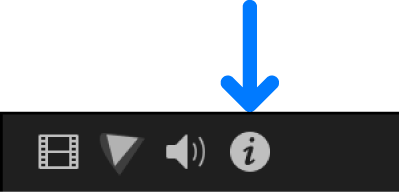
Click the Info button at the top of the inspector.
In the Info inspector, click the Modify RED RAW Settings button.
In the RED RAW Settings window, adjust the settings.
Your changes are saved nondestructively to an external metadata file with the file extension .RMD, overwriting any existing RMD metadata file. Unlike video effects that are applied to a clip, these adjustments are associated with the file (via the RMD metadata file). Any changes you make to these settings are applied to all copies of the selected clip or clips.
To produce wide-gamut colors for HDR without the use of a LUT, set Color Space to Rec. 2020 and Gamma to HDR-2084. For information about wide-gamut HDR settings in Final Cut Pro, see Use wide-gamut HDR color processing in Final Cut Pro for Mac.
Note: Final Cut Pro supports the RED ROCKET card, a PCI card that provides a significant boost in performance. For more information about REDCODE RAW (R3D) files and the RED ROCKET card, go to http://www.red.com.
Download this guide: PDF