AirPort Express 802.11n (2nd Generation): Guide to ports and connectors
Learn about ports and connectors of AirPort Express 802.11n (2nd Generation).
AirPort Express 802.11n (2nd Generation) has a number of ports and connectors with various functions.
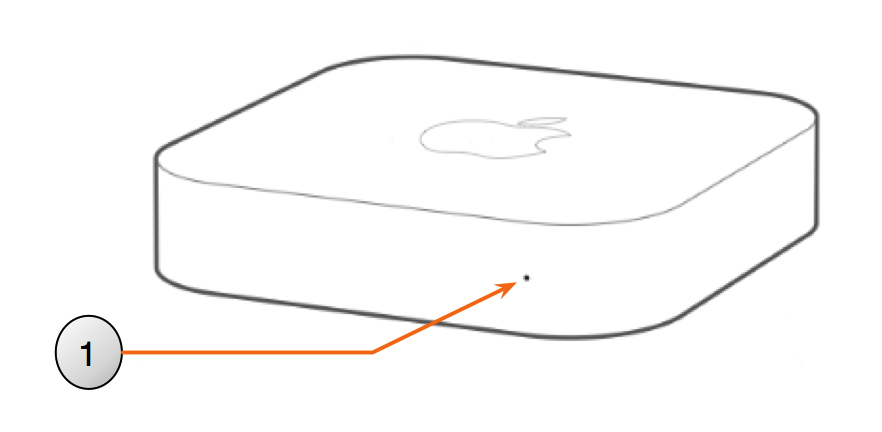
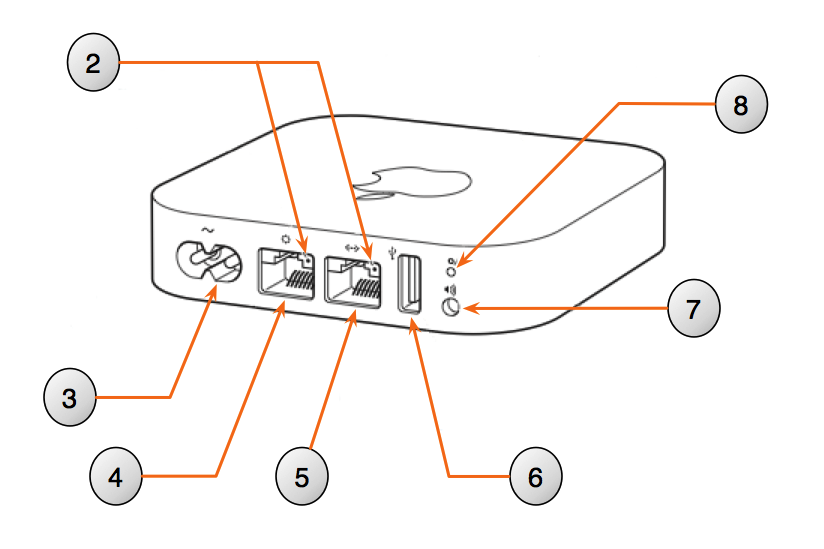
Name | Description | |
|---|---|---|
1 | Status LED | Shows the status of your AirPort Express. Click here to learn more about the status LED. |
2 | Link light | Lights up when it detects connectivity with another device. |
3 | Power | For connecting AirPort Express to an AC power source. |
4 | WAN | For connecting a DSL or cable modem, or for connecting to an existing Ethernet network. |
5 | LAN | For connecting Ethernet devices such as printers, switches, and computers. |
6 | USB | For connecting a USB printer. |
7 | Analog and optical digital audio Out | For connecting AirPort Express to a stereo or powered speakers. |
8 | Reset button | For resetting AirPort Express. Click here to learn more about resetting. |
Learn more
Go to the Apple Support page to learn more about your AirPort Express 802.11n (2nd Generation) and Apple networks.