About LCD display pixel anomalies for Apple products released in 2010 and later
Learn about pixel anomalies, why such anomalies occur, and what to do if you think your LCD panel has more than an acceptable number of pixel anomalies.
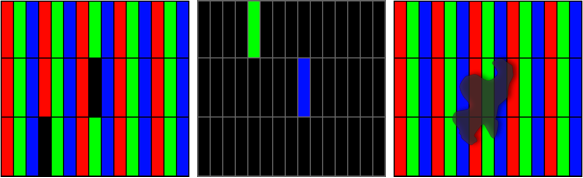
Many Apple products use liquid crystal displays (LCD). LCD technology uses rows and columns of addressable points (pixels) that render text and images on the screen. Each pixel has three separate subpixels—red, green and blue—that allow an image to render in full color. Each subpixel has a corresponding transistor responsible for turning that subpixel on and off.
Depending on the display size, there can be thousands or millions of subpixels on the LCD panel. For example, the LCD panel used in the iMac (Retina 5K, 27-inch, 2019) has a display resolution of 5120 x 2880, which means there are over 14.7 million pixels. Each pixel is made up of a red, a green, and a blue subpixel, resulting in over 44 million individual picture elements on the 27-inch display. Occasionally, a transistor may not work perfectly, which results in the affected subpixel remaining off (dark) or on (bright). With the millions of subpixels on a display, it is possible to have a low number of such transistors on an LCD. In some cases a small piece of dust or other foreign material may appear to be a pixel anomaly. Apple strives to use the highest quality LCD panels in its products, however pixel anomalies can occur in a small percentage of panels.
In many cases pixel anomalies are caused by a piece of foreign material that is trapped somewhere in the display or on the front surface of the glass panel. Foreign material is typically irregular in shape and is usually most noticeable when viewed against a white background. Foreign material that is on the front surface of the glass panel can be easily removed using a lint free cloth. Foreign material that is trapped within the screen must be removed by an Apple Authorized Service Provider or Apple Retail Store.
If you are concerned about pixel anomalies on your display, take your Apple product in for closer examination at an Apple Store, Apple Authorized Service Provider, or an Independent Repair Provider. There may be a charge for the evaluation. Genuine Apple parts are also available for out-of-warranty repairs through Self Service Repair.*
Dark Pixel Anomaly Bright Pixel Anomaly Foreign Material
Learn more
Learn more about pixel anomalies on earlier Apple products.
* Independent Repair Providers have access to genuine Apple parts, tools, training, service guides, diagnostics, and resources. Repairs by Independent Repair Providers are not covered by Apple's warranty or AppleCare plans, but might be covered by the provider's own repair warranty. Self Service Repair provides access to genuine Apple parts, tools, and repair manuals so that customers experienced with the complexities of repairing electronic devices can perform their own out-of-warranty repair. Self Service Repair is currently available in certain countries or regions for specific models of Mac computers introduced in 2020 or later. To view repair manuals and order parts for eligible models, go to the Self Service Repair page.