Identify your Mac Pro model
Use this information to find out which Mac Pro you have, and where it fits in the history of Mac Pro.
There are several ways to help identify your Mac. The simplest is About This Mac, available by choosing About This Mac from the Apple menu in the upper-left corner of your screen. The other is the System Information app. Learn how to use these tools to identify your Mac.
If you don't have your Mac or it doesn't start up, use one of these solutions instead:
Find the serial number printed on the underside of your Mac, near the regulatory markings. On previous Mac Pro models, the serial number is printed on the computer's back panel, below the video ports. It's also on the original packaging, next to a barcode label. You can then enter that serial number on the Check Coverage page or Tech Specs page to find your model.
The original packaging might also show an Apple part number, such as MLH12xx/A ("xx" is a variable that differs by country or region). You can match the Apple part number to one in the list below to find your model.
2023
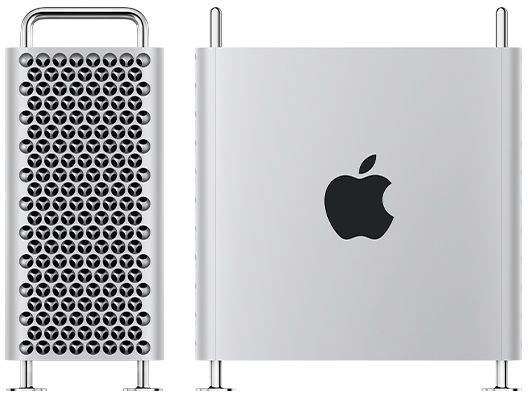
Mac Pro (2023)
Model Identifier: Mac14,8
Newest compatible operating system: macOS Sonoma
Tech Specs: Mac Pro (2023)
User Guide: Mac Pro (2023)

Mac Pro (Rack, 2023)
Model Identifier: Mac14,8
Newest compatible operating system: macOS Sonoma
Tech Specs: Mac Pro (Rack, 2023)
User Guide: Mac Pro (Rack, 2023)
2019
Mac Pro (2019)
Model Identifier: MacPro7,1
Newest compatible operating system: macOS Sonoma
Tech Specs: Mac Pro (2019)
User Guide: Mac Pro (2019)
Mac Pro (Rack, 2019)
Model Identifier: MacPro7,1
Newest compatible operating system: macOS Sonoma
Tech Specs: Mac Pro (Rack, 2019)
User Guide: Mac Pro (Rack, 2019)
2013

Mac Pro (Late 2013)
Model Identifier: MacPro6,1
Newest compatible operating system: macOS Monterey
Part Numbers: ME253xx/A, MD878xx/A
Tech Specs: Mac Pro (Late 2013)
2012

Mac Pro (Mid 2012)
Model Identifier: MacPro5,1
Part Numbers: MD770xx/A, MD771xx/A
Newest compatible operating system: macOS Mojave*
Tech Specs: Mac Pro (Mid 2012)
User Guide: Mac Pro (Mid 2012)
Mac Pro Server (Mid 2012)
Model Identifier: MacPro5,1
Part Number: MD772xx/A
Newest compatible operating system: macOS Mojave*
Tech Specs: Mac Pro Server (Mid 2012)
* To install macOS Mojave on Mac Pro models from 2012, a Metal-capable graphics card is required.
2010
Mac Pro (Mid 2010)
Model Identifier: MacPro5,1
Part Numbers: MC250xx/A, MC560xx/A, MC561xx/A
Newest compatible operating system: macOS Mojave*
Tech Specs: Mac Pro (Mid 2010)
Mac Pro Server (Mid 2010)
Model Identifier: MacPro5,1
Part Number: MC915xx/A
Newest compatible operating system: macOS Mojave*
Tech Specs: Mac Pro Server (Mid 2010)
User Guide: Mac Pro Server (Mid 2010)
* To install macOS Mojave on Mac Pro models from 2010, a Metal-capable graphics card is required.
2009
Mac Pro (Early 2009)
Model Identifier: MacPro4,1
Part Numbers: MB871xx/A, MB535xx/A
Newest compatible operating system: OS X El Capitan
Tech Specs: Mac Pro (Early 2009)