Status icons and symbols on your iPhone
Learn what the status icons and symbols at the top of your screen mean.
Where status icons appear
Status icons appear in the status bar on your iPhone:

iPhone models with Face ID

iPhone models with Touch ID
If you don't see an icon, check Control Center by swiping down from the top-right corner.
About the status icons on your iPhone
To learn what an icon means, find it below.

Your carrier’s 5G network is available, and your iPhone can connect to the internet over that network. Works with iPhone 12 and later. (Not available in all areas.)

Your carrier’s 5G network with higher frequency is available, and your iPhone can connect to the internet over that network. Works with iPhone 12 and later. (Not available in all areas.)

Your carrier’s 5G E network is available, and your iPhone can connect to the internet over that network. Works with iPhone 8 and later. (Not available in all areas.)

Your carrier’s LTE network is available, and your iPhone can connect to the internet over that network. Works with iPhone 5 and later. (Not available in all areas.)

Your carrier’s 3G UMTS (GSM) or EV-DO (CDMA) network is available, and your iPhone can connect to the internet over that network.

Your carrier’s 4G UMTS (GSM) or LTE network is available, and your iPhone can connect to the internet over that network. (Not available in all areas.)

Your carrier’s GPRS (GSM) or 1xRTT (CDMA) network is available, and your iPhone can connect to the internet over that network.

Your carrier’s EDGE (GSM) network is available, and your iPhone can connect to the internet over that network.

You’re in range of your cellular network and can make and receive calls. If there’s no signal, "No service" or "SOS" appears.

On your iPhone with Dual SIM capability, you’re in range of your cellular network and can make and receive calls. If there’s no signal, "No service" or "SOS" appears.

You can use Wi-Fi calling. Your carrier also appears next to the icon.

Your iPhone is connected to the internet over Wi-Fi.

You’re connected to a network using VPN.

You're no longer connected to a VPN network.

An app or website is using Location Services. A blue arrow may appear when the app you’re using requests your location.

There’s network activity.

Call Forwarding is on.

Airplane Mode is on. You can’t make calls or use Bluetooth until you turn off this setting.

Teletype (TTY) is on.

Portrait Orientation Lock is on. Your screen won't rotate until you turn off this setting.

Silent mode is on. This setting uses only vibrations and silences the ringer for calls, alerts, and notifications. It does not silence alarms.

Do Not Disturb is on. This setting silences calls, alerts, and notifications until you turn it off. It does not silence alarms.

Driving Focus is on. This setting silences calls, alerts, and notifications while driving until you turn it off. It does not silence alarms.

Sleep Focus is on. This setting silences calls, alerts, and notifications according to your sleep schedule. It does not silence alarms.

Your iPhone is syncing with iTunes.

Your iPhone is locked with a passcode or Touch ID.

Your iPhone is paired with a headset, headphones, or earbuds.

An alarm is set.

This icon shows the battery level of your iPhone. If this icon is yellow, Low Power Mode is on. If this icon is red, then your iPhone has less than 20% charge.

The battery level of your paired Bluetooth device.

Your iPhone is connected to the internet through the Personal Hotspot of another iOS device.

Your iPhone is charging.

Your iPhone is connected to CarPlay.

You're sharing your screen with SharePlay.

SharePlay is active.

There is no cellular and Wi-Fi coverage, but Emergency SOS via satellite is available in your location. Works with iPhone 14 or later.

Voice Control is listening for your commands.
If you see SOS in the status bar
SOS might appear in the status bar of your iPhone or iPad. When you see this message, your device isn't connected to your cellular network, but you can make emergency calls through other carrier networks.

The feature of SOS appearing in the status bar of iPhone and iPad is available in Australia, Canada, and the United States.
If you see blue, green, red, or purple in the status bar
On iPhone X and later, the color shows as a bubble behind the time. On iPhone 8 or earlier, the color goes all the way across the status bar. Here's what each color means:

Your iPhone is using Screen Mirroring, or an app is actively using your location.

You're on a call or your iPhone is providing a Personal Hotspot.*

Your iPhone is either recording sound or your screen.

Your iPhone is using SharePlay to share content.
* For Personal Hotspot on iPhone 8 or earlier, you can also see how many devices joined your hotspot. appears in the status bar of iOS devices using Personal Hotspot.
If you see orange or green indicators in the status bar
With iOS 14 and later, you might see an orange or green indicator in the status bar on your iPhone. These indicators appear when the microphone and/or camera are being used by an app.
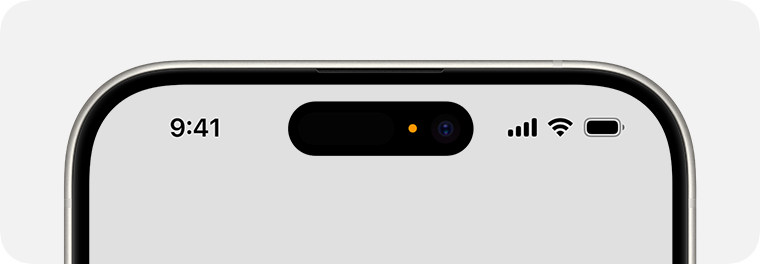
An orange indicator means the microphone is being used by an app on your iPhone.

A green indicator means either the camera or the camera and the microphone are being used by an app on your iPhone.
About other icons in Control Center
Learn about the icons in Control Center on your iPhone.