About the battery usage on your iPhone, iPad, and iPod touch
Learn how to check the amount of battery used by each app on your iPhone, iPad, or iPod touch.
Check battery usage
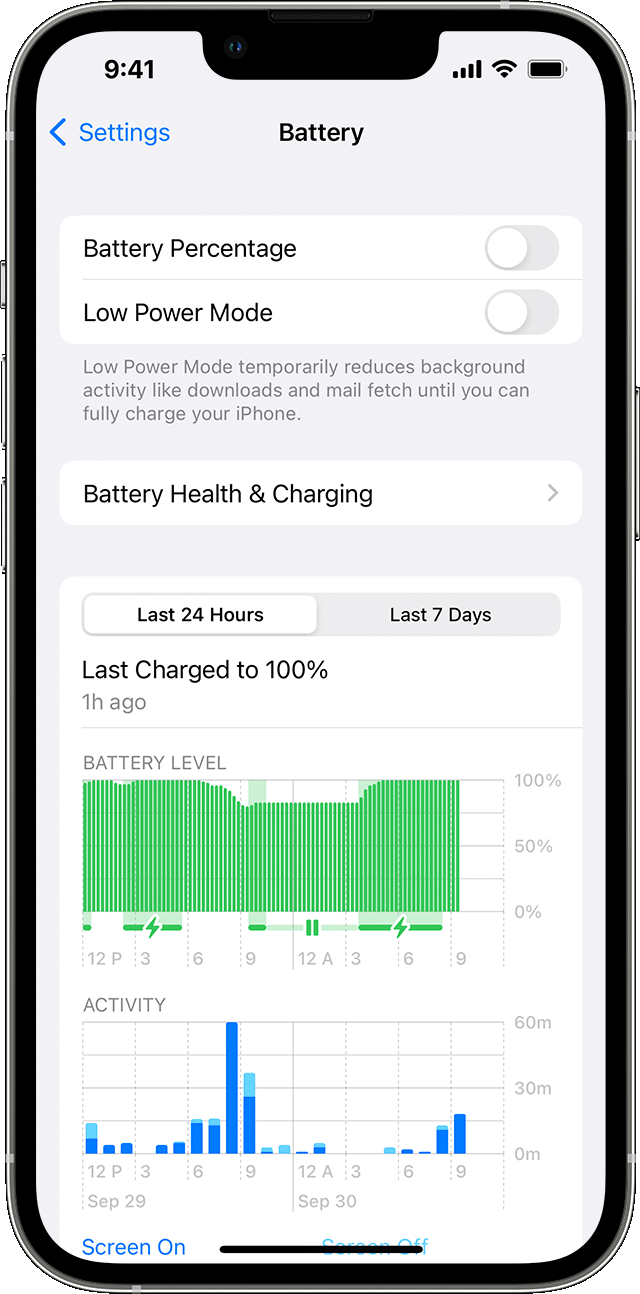
To see an overview of your battery level and activity for the last 24 hours and up to the last 10 days, go to Settings > Battery.
When you tap one of the time periods above the Activity graph (Last 24 Hours or Last [X] Days), you can see which apps contributed to your battery usage during that time period, and the proportion of battery used for the app.
To see how long each app was in use on screen (the dark blue bars) or in the background (the light blue bars), tap Show Activity. Under each app, you might see these usage types:
Background Activity means that most of the app's battery usage — such as playing music or tracking location — happened while the app was in the background.
No Cell Coverage and Low Signal means that your device was searching for a signal or being used with a low signal.
Connected to Charger means the app was used only when your device was charging.
You can also see when your device was last connected to a charger and the last charge level. With iOS 16, you can see if charging paused because of Optimized Battery Charging, Clean Energy Charging, or temperature.
Adjust settings to improve battery life
While viewing your battery usage, you might get a suggestion like Enable Auto-Brightness or Adjust Display Brightness. This is because the software determined that changing these settings could improve your battery life.
Learn more about maximizing the battery performance and lifespan of your iPhone, iPad, or iPod touch.
Use Low Power Mode
If you want to extend the battery life on your iPhone, turn on Low Power Mode. This reduces power consumption until you turn it off or charge your iPhone to 80 percent. When Low Power Mode is on, certain settings and features, like app updates, downloads of new TV shows or podcast episodes, mail fetch, and some visual effects such as True Tone, are reduced or disabled.
Learn more about Low Power Mode.
Learn more
With iOS 11.3 and later, you can see your battery health and if a battery needs to be replaced. Find out more in iPhone Battery and Performance.

