Determine battery cycle count for Mac laptops
Learn how to determine the number of cycles your Mac laptop's battery has.
Learn about battery cycles
When you use your Mac laptop, its battery goes through charge cycles. A charge cycle happens when you use all of the battery’s power—but that doesn’t necessarily mean in a single charge.
For example, you could use half of your laptop's charge in one day, and then recharge it fully. If you did the same thing the next day, it would count as one charge cycle, not two. In this example, it might take several days to complete a cycle.
Batteries have a limited amount of charge cycles before their performance is expected to diminish. Once the cycle count is reached, a replacement battery is recommended to maintain performance. You can use your battery after it reaches its maximum cycle count, but you might notice a reduction in your battery life. In macOS Catalina 10.5.5 or later, you can turn on optimized battery charging to help reduce battery aging. This lets your Mac learn your charging routine and wait to charge past 80% until you need to use it.
Knowing how many charge cycles your battery has and how many are left can help you determine when a battery replacement is required. Your battery is designed to retain up to 80% of its original charge capacity at its maximum cycle count. For best performance, replace your battery when you reach its maximum cycle count.
Find your battery's cycle count
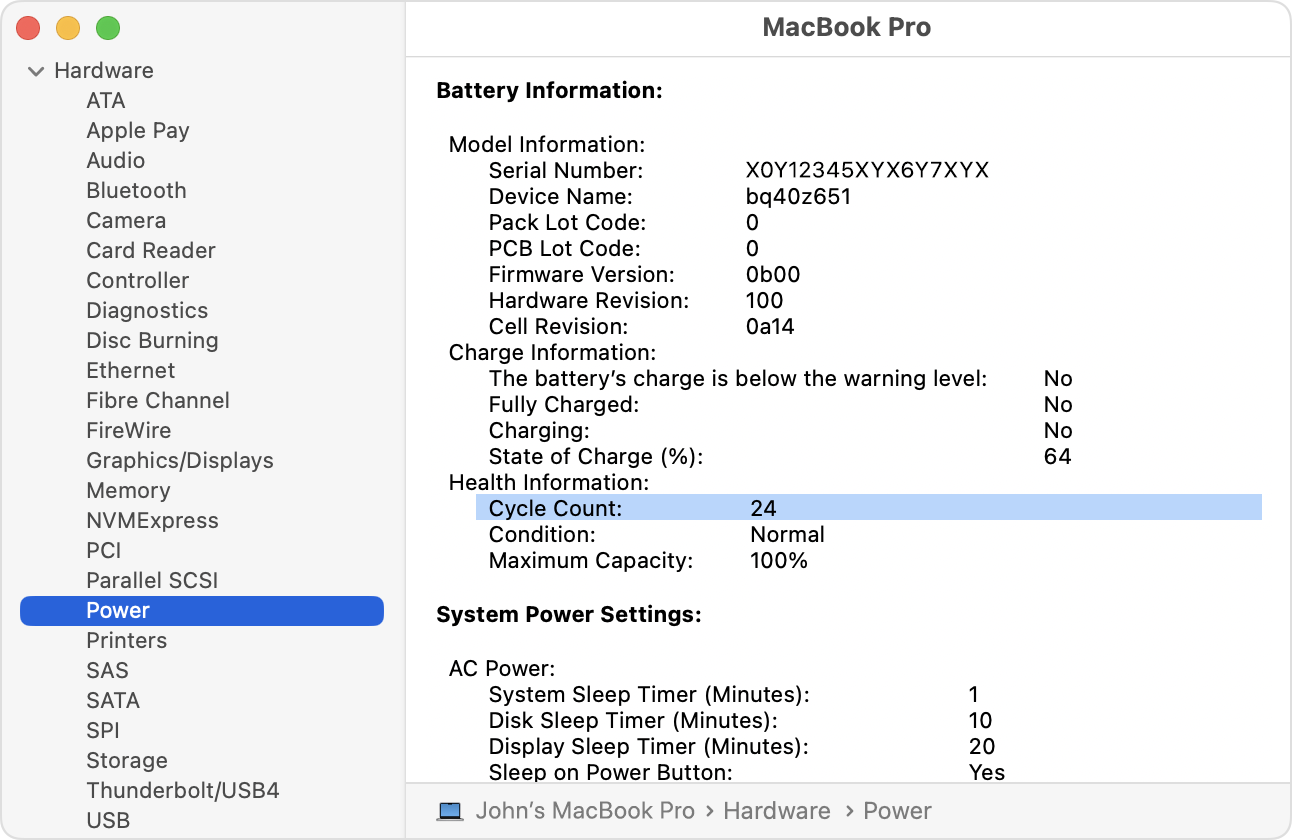
To access information about your Mac laptop battery, including its cycle count:
Hold the Option key and click the Apple menu , then choose System Information.
Under the Hardware section of the System Information window, select Power. The current cycle count is listed under the Battery Information section.
Identify your computer
Cycle count limits vary between Mac models. For help identifying your Mac laptop, use the Tech Specs page for your model or:
Find your battery cycle count
Use the table below to see the cycle count limit for your computer's battery. The battery is considered consumed once it reaches the limit.
Computer | |
|---|---|
MacBook (Retina, 12-inch, 2017) MacBook (Retina, 12-inch, Early 2016) MacBook (Retina, 12-inch, Early 2015) MacBook (13-inch, Mid 2010) MacBook (13-inch, Late 2009) | 1000 |
MacBook (13-inch Aluminum, Late 2008) | 500 |
MacBook (Mid 2009) MacBook (Early 2009) MacBook (Late 2008) MacBook (Early 2008) MacBook (Late 2007) MacBook (Mid 2007) MacBook (Late 2006) MacBook (13-inch) | 300 |
MacBook Neo | 1000 |
MacBook Pro (14-inch, M5 Pro or M5 Max) MacBook Pro (16-inch, M5 Pro or M5 Max) MacBook Pro (14-inch, M5) MacBook Pro (14-inch, 2024) MacBook Pro (16-inch, 2024) MacBook Pro (14-inch, Nov 2023) MacBook Pro (16-inch, Nov 2023) MacBook Pro (14-inch, 2023) MacBook Pro (16-inch, 2023) MacBook Pro (13-inch, M2, 2022) MacBook Pro (14-inch, 2021) MacBook Pro (16-inch, 2021) MacBook Pro (13-inch, M1, 2020) MacBook Pro (13-inch, 2020, Two Thunderbolt 3 ports) MacBook Pro (13-inch, 2020, Four Thunderbolt 3 ports) MacBook Pro (16-inch, 2019) MacBook Pro (15-inch, 2019) MacBook Pro (13-inch, 2019, Four Thunderbolt 3 ports) MacBook Pro (13-inch, 2019, Two Thunderbolt 3 ports) MacBook Pro (15-inch, 2018) MacBook Pro (13-inch, 2018, Four Thunderbolt 3 ports) MacBook Pro (15-inch, 2017) MacBook Pro (13-inch, 2017, Four Thunderbolt 3 ports) MacBook Pro (13-inch, 2017, Two Thunderbolt 3 ports) MacBook Pro (15-inch, 2016) MacBook Pro (13-inch, 2016, Four Thunderbolt 3 ports) MacBook Pro (13-inch, 2016, Two Thunderbolt 3 ports) MacBook Pro (Retina, 13-inch, Early 2015) MacBook Pro (Retina, 13-inch, Mid 2014) MacBook Pro (Retina, 13-inch, Late 2013) MacBook Pro (Retina, 13-inch, Early 2013) MacBook Pro (Retina, 13-inch, Late 2012) MacBook Pro (13-inch, Mid 2012) MacBook Pro (13-inch, Late 2011) MacBook Pro (13-inch, Early 2011) MacBook Pro (13-inch, Mid 2010) MacBook Pro (13-inch, Mid 2009) MacBook Pro (Retina, 15-inch, Mid 2015) MacBook Pro (Retina, 15-inch, Mid 2014) MacBook Pro (Retina, 15-inch, Late 2013) MacBook Pro (Retina, 15-inch, Early 2013) MacBook Pro (Retina, Mid 2012) MacBook Pro (15-inch, Mid 2012) MacBook Pro (15-inch, Late 2011) MacBook Pro (15-inch, Early 2011) MacBook Pro (15-inch, Mid 2010) MacBook Pro (15-inch, 2.53 GHz, Mid 2009) MacBook Pro (15-inch Mid 2009) MacBook Pro (17-inch, Late 2011) MacBook Pro (17-inch, Early 2011) MacBook Pro (17-inch, Mid 2010) MacBook Pro (17-inch, Mid 2009) MacBook Pro (17-inch, Early 2009) | 1000 |
MacBook Pro (15-inch Late 2008) | 500 |
MacBook Pro (15-inch, Early 2008) MacBook Pro (15-inch, 2.4/2.2GHz) MacBook Pro (15-inch, Core 2 Duo) MacBook Pro (15-inch Glossy) MacBook Pro (15-inch) MacBook Pro (17-inch, Late 2008) MacBook Pro (17-inch, Early 2008) MacBook Pro (17-inch, 2.4GHz) MacBook Pro (17-inch Core 2 Duo) MacBook Pro (17-inch) | 300 |
MacBook Air (13-inch, M5) MacBook Air (15-inch, M5) MacBook Air (13-inch, M4, 2025) MacBook Air (15-inch, M4, 2025) MacBook Air (13-inch, M3, 2024) MacBook Air (15-inch, M3, 2024) MacBook Air (15-inch, M2, 2023) MacBook Air (M2, 2022) MacBook Air (M1, 2020) MacBook Air (Retina, 13-inch, 2020) MacBook Air (Retina, 13-inch, 2019) MacBook Air (Retina, 13-inch, 2018) MacBook Air (13-inch, 2017) MacBook Air (11-inch, Early 2015) MacBook Air (11-inch, Early 2014) MacBook Air (11-inch, Mid 2013) MacBook Air (11-inch, Mid 2012) MacBook Air (11-inch, Mid 2011) MacBook Air (11-inch, Late 2010) MacBook Air (13-inch, Early 2015) MacBook Air (13-inch, Early 2014) MacBook Air (13-inch, Mid 2013) MacBook Air (13-inch, Mid 2012) MacBook Air (13-inch, Mid 2011) MacBook Air (13-inch, Late 2010) | 1000 |
MacBook Air (Mid 2009) | 500 |
MacBook Air (Late 2008) MacBook Air | 300 |
Learn more
Testing conducted by Apple under ideal conditions. Battery life and capacity percentage varies by use, configuration, and charging behavior. See apple.com/batteries for more information.