Mac OS X Server: How to reset the Open Directory administrator password
Learn how to reset the Open Directory administrator password.
Getting Started
You can reset the Open Directory administrator password without touching user data. For example, you might need to do this if an Open Directory administrator departs without providing the password.
You will need the slot ID for the Open Directory administrator user, so must first extract the slot ID from the directory. Then you will need to change the administrator password. You will need local administrator privileges on the server as well as access to the server via an interactive shell (such as Terminal or SSH) to do this.
Extracting the slot ID
Mountain Lion and later
For resetting the Open Directory administrator password for OS X v10.8 and later, follow the instructions in this article.
Lion Server
Open Directory Editor and authenticate with your administrator username and password. It is located in /System/Library/CoreServices/Directory Utility.
Choose the Directory Editor pane.
Navigate to the Open Directory Master node. You do this by selecting the node popup menu and select the "/LDAPv3/127.0.0.1" entry.
Select the directory administrator account.
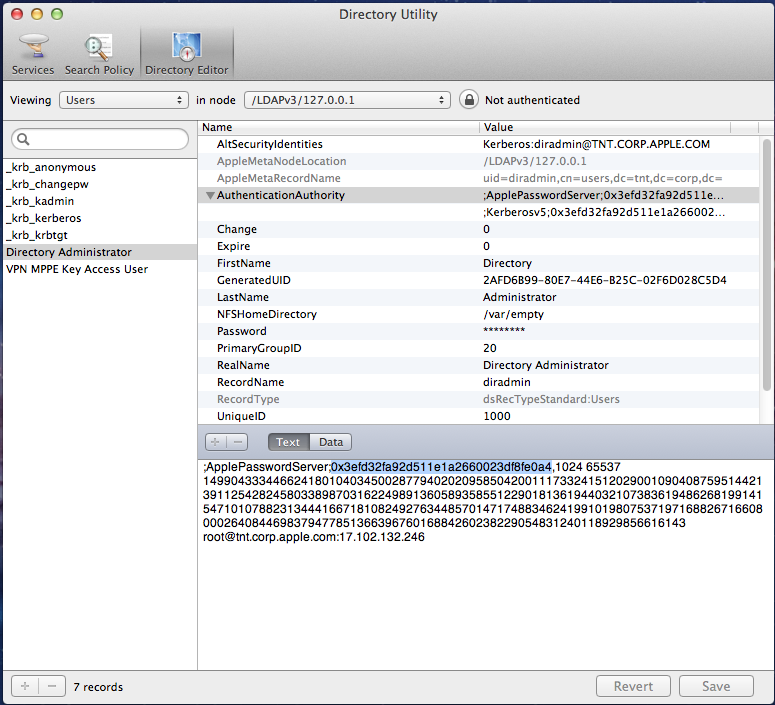
In the list of attributes that appears, click the disclosure triangle next to AuthenticationAuthority to display all associated values.
Select the value within the AuthenticationAuthority attribute which begins with ";ApplePasswordServer;"
Click the "Text" pane below.
The value between ";ApplePasswordServer;" and the comma is the slot ID, as shown highlighted below. Copy this value for later use. It starts with 0x.
Mac OS X Server v10.3 through v10.6
Open Workgroup Manager with your administrator username and password.
Navigate to the Open Directory Master node. (Note: Your Workgroup Manager connection can be to either the master or a replica, just so long as you navigate to the Master node once connected.)
In Workgroup Manager Preferences select the option to "Show 'All Records' tab and inspector."
Select the directory administrator account, and click the Inspector tab.
In the list of attributes that appears, click the disclosure triangle next to AuthenticationAuthority to display all associated values.
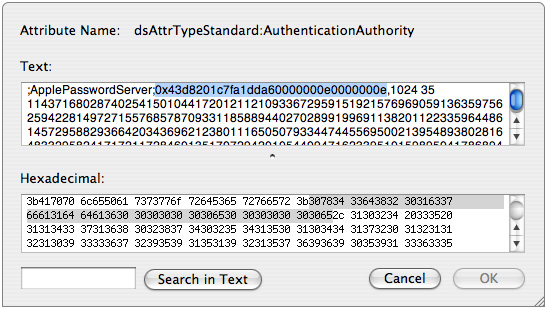
Select the value within the AuthenticationAuthority attribute that begins with ";ApplePasswordServer;".
Click View.
The value after ";ApplePasswordServer;" until the comma is the slot ID, as shown below. Copy this value for later use.
Extracting the slot ID using Terminal (Mac OS X Server v10.3 through 10.7.4)
Log into the server using a local administrator user account, and open Terminal.
Execute this command:
sudo mkpassdb -dumpEnter your administrator password when prompted.
A list of user short names with corresponding slot ID's will be listed. Find the <slot-ID>, which is located to the left of the directory administrators short name. The ID starts with 0x and ends before the user's short name. For example:
"slot 002: 0x479e48fe68b4567000000002000000002 diradmin 03/11/2008 02:12:30 PM"Copy this value for later use.
Resetting the Open Directory administrator password
Lion Server and later
For resetting the Open Directory administrator password for OS X 10.7.5 and later, follow the instructions in this article.
Mac OS X Server v10.3 through 10.7.4
Log into the server using a local administrator user account, and open the Terminal.
Enter this command:
sudo suEnter your administrator password when prompted.
Enter the following command:
mkpassdb -setpassword slot-IDReplace <slot-ID> with the value you previously obtained. You are then prompted for the new directory administrator password. If you are unable to obtain the <slot-ID> using Workgroup Manager use the Terminal directions instead.
Important: At this point, you have root privileges in this session. To avoid potential issues to the system, be sure to quit Terminal once you are done.